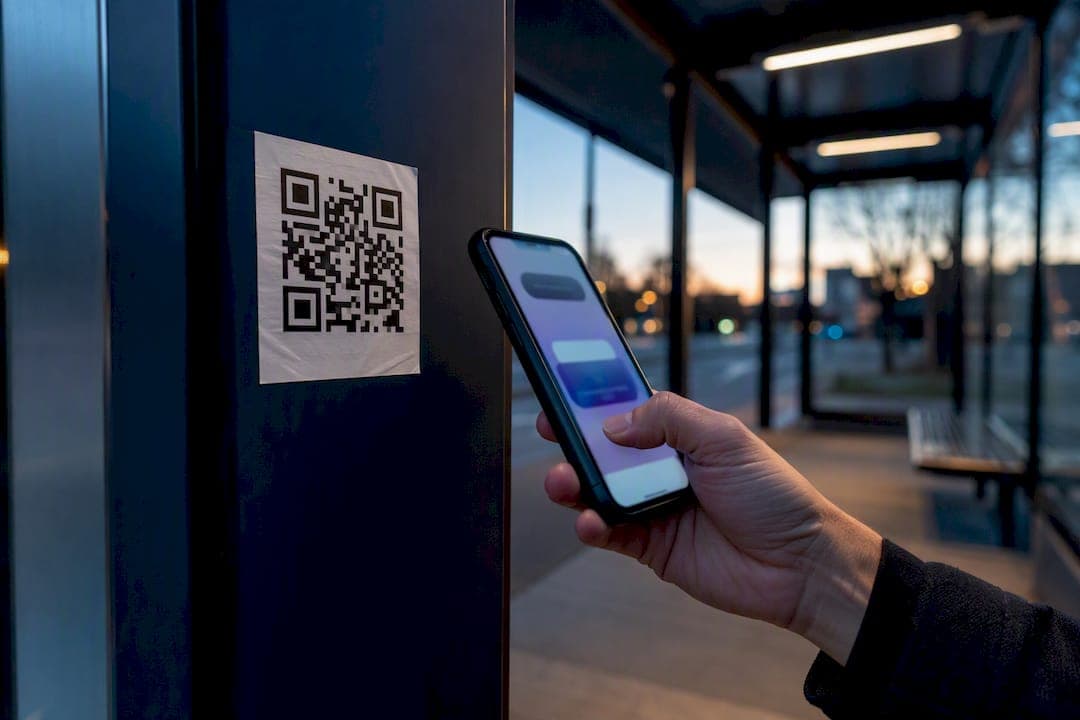
QR-code phishing, known as quishing, can steal your logins, redirect a payment, or quietly install malware on your phone. If a code seems off in any way, don't type in a password or card number, glance at the link preview first, and disconnect from Wi-Fi immediately if the page looks wrong. The Federal Trade Commission, FBI, and AARP have all issued warnings this year.
TL;DR:
- Most QR code scams rely on fake or tampered stickers placed over legitimate codes at parking meters, restaurants, or package deliveries, tricking users into revealing sensitive information.
- Attackers route malicious links through trusted hosting services to bypass security filters, often leading to nearly identical fake login pages designed to steal credentials or install malware.
- Quickly disconnecting from the internet and verifying links before entering any information can prevent most damage once a suspicious code is scanned.
- Physical signs of a scam include crooked placement, different paper textures, or raised sticker edges, while digital checks involve inspecting link previews for misspellings or HTTP addresses.
- Reporting scams to authorities like the FTC, FBI, or local police helps combat QR code fraud and protect others from falling victim.
Table of Contents
- How Do QR Code Scams Actually Work?
- What Are the Most Common QR Code Scams?
- How Can You Tell If a QR Code Is Fake?
- What Should You Do If You Scanned a Suspicious QR Code?
- How Do You Protect Yourself From Future QR Code Scams?
- Where Should You Report a QR Code Scam?
- Scruteon Keeps You a Step Ahead of the Next Scam
- Sources
- FAQ
How Do QR Code Scams Actually Work?
A QR code is a black box. You cannot read where it leads until your camera scans it, and that blind trust is exactly what scammers exploit. Once you scan, your phone opens a link automatically, often before you've had a second to think about it.
Here's the technical trick that makes quishing harder to catch than a normal phishing email: attackers route the scan through one or two legitimate hosting services, like Google, Cloudflare, or AWS, before it lands on the fake page. That redirect chain helps the malicious link slide past automated security filters that would otherwise flag it, according to a breakdown by How-To Geek. On a small phone screen, the fake login page that follows can look nearly identical to the real one.
What are attackers actually after once you land on that page? Usually one of these:
- Harvesting your username and password on a spoofed login screen
- Rerouting a payment you thought you were sending to a business or landlord
- Installing malware or a remote-access tool disguised as an app update
- Enrolling you in a recurring subscription you never agreed to
NBC News reports quishing has spread fast partly because people scan without thinking twice. It shows up on stickers slapped over real codes, in unsolicited texts and emails, and even taped to unexpected packages that show up on your doorstep.
What Are the Most Common QR Code Scams?
Quishing isn't one trick. It's a handful of setups scammers reuse because they consistently work. Here's what to watch for:
- The QR code parking scam. A sticker appears on a parking meter or garage kiosk promising a quick, contactless way to pay. Scan it, and you land on a fake payment page that captures your card details while the real meter never gets paid.
- The menu or flyer swap. At a restaurant or event, someone replaces the legitimate QR code with a lookalike sticker. You think you're ordering food or registering for a raffle. You're actually handing over payment info.
- The delivery reschedule text. You get a text claiming a package missed delivery, with a QR code to "reschedule." Scanning it drops you on a phishing page built to mimic a shipping carrier's site.
- The brushing scam package. An unsolicited box shows up at your door, something you never ordered, with a QR code printed inside promising a prize or refund. The FBI has specifically flagged this pattern as a growing fraud method tied to unsolicited packages.
- Fake tickets and tech-support links. Bogus event tickets or "your account needs verification" messages carry QR codes that lead to credential-harvesting pages or a fake tech-support chat designed to talk you into installing remote-access software.
Security researchers note that attackers gravitate toward payment-related spots precisely because you already expect to pay there, so you're less likely to double-check the code, per NBC News.
How Can You Tell If a QR Code Is Fake?
Two categories of checks matter here, and both take under ten seconds once you get in the habit.
Physical checks, for codes you encounter in person:
- Run a finger over the code. A sticker slapped on top of the original often has a raised edge or a slightly different texture.
- Look for crooked placement. Legitimate signage is usually printed and aligned; a scam sticker is often slapped on at an angle.
- Check the paper or finish. A glossy sticker over a matte menu, or vice versa, is a giveaway.
Digital checks, once you've scanned:
- Read the link preview before tapping "open." Look for misspelled brand names, odd subdomains, or a plain HTTP address instead of HTTPS.
- Be suspicious of any link that immediately prompts a login or a file download. Legitimate sites rarely demand credentials the instant you land on them.
- Watch for shortened URLs (bit.ly, tinyurl) hiding the real destination on codes where you'd expect a direct link.
Montgomery County Police note that legitimate QR codes rarely demand sensitive information right away. Requests for a password or card number with no clear reason are a red flag.
Pro Tip: Instead of tapping the previewed link, copy it and paste it into a free link checker, or just open your browser and type the business's known website manually. It takes ten extra seconds and sidesteps the entire scam.
What Should You Do If You Scanned a Suspicious QR Code?
Speed matters more than perfection here. Work through this in order:
- Cut the connection. Turn off Wi-Fi and mobile data right away, then close the browser or app. Montgomery County Police list this as one of the fastest ways a nontechnical user can stop ongoing damage, since it interrupts downloads or data leaving your device in the background.
- Lock down your accounts. Change passwords on anything you logged into after the scan, turn on multi-factor authentication, and scan your recent transactions for anything unfamiliar.
- Check your device. Run a reputable mobile security scan and delete any app you don't remember installing, along with permissions that look excessive.
- Report and document. If you entered payment details, call your bank immediately. Screenshot the QR code and the suspicious URL before you delete anything, then file a report.
Quick reference for what to secure and how:
- Email and banking passwords: change immediately, enable MFA
- Recent card transactions: review for unauthorized charges
- Installed apps: audit and remove anything unrecognized
- Suspicious URL and code: save a screenshot before reporting
How Do You Protect Yourself From Future QR Code Scams?
Most quishing attempts fail against a few consistent habits, not expensive software.
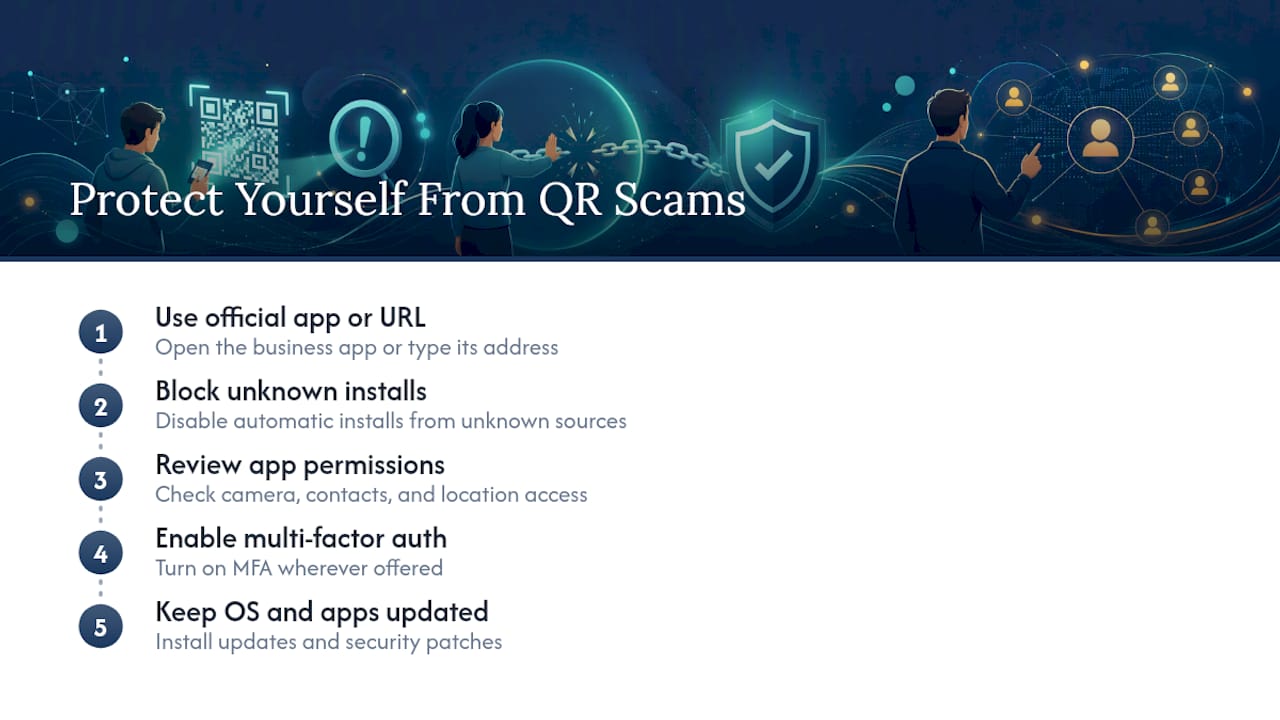
Turn on multi-factor authentication everywhere it's offered, so a stolen password alone isn't enough to get into your accounts. Keep your phone's operating system and apps updated, since patches close the exact vulnerabilities malware relies on, and pair that with reputable mobile security software if your device doesn't already include strong built-in protection.
For payments and logins specifically, skip the QR code when you can. Open the business's official app or type its address into your browser manually instead of scanning. Disable automatic app installs from unknown sources, and periodically review which apps have access to your camera, contacts, and location.
If you're the tech-savvy one in your family, teach the less technical people in your life one simple rule: don't scan a code you didn't expect, and if something feels off, call the business directly to verify before doing anything else. AARP specifically recommends this kind of physical inspection habit for older adults, since it doesn't require any technical know-how, just a moment of pause.
Where Should You Report a QR Code Scam?
Reporting does two things: it might help you recover losses, and it feeds pattern data that helps agencies shut down active scam campaigns faster.
- File a complaint with the Consumer, which tracks consumer fraud trends nationally.
- Report to the FBI's Internet Crime Complaint Center (IC3), especially for anything involving a suspicious package or financial loss.
- Contact your local police department, particularly if the fake code was physically placed somewhere, like a parking meter or restaurant table.
- Tell the business or venue where you found the tampered code. They can remove the sticker before the next person scans it.
- If you're worried about identity theft following a scan, start with account-hardening steps and pull your credit report for anything unfamiliar.
For general safety literacy beyond scams, resources like Well-Check's safety guidance offer another angle on building good verification habits at home.
Scruteon Keeps You a Step Ahead of the Next Scam
Quishing tactics change fast, and a scam sticker on a parking meter today looks different from the fake delivery text making the rounds next month. Scruteon offers a free newsletter that breaks down current scams in plain language, helping readers stay informed about emerging QR code threats.
If you've already scanned something suspicious, or you're just staring at a code on a flyer wondering if it's legit, you don't have to guess alone. Scruteon's free advice page lets you send in a suspicious link or message for a quick read on whether it's a scam. For ongoing protection, sign up for the newsletter and get the next quishing pattern in your inbox before it reaches your neighborhood.
Sources
- Scammers hide harmful links in QR codes to steal your information | FTC
- Unsolicited packages containing QR codes used to initiate fraud schemes | FBI
- What you must know before scanning a QR code | AARP
- Fake QR Codes - Montgomery County Police Department
FAQ
How do you know if a QR code is legit?
Check the physical code for sticker edges, misalignment, or a different paper texture, then read the link preview after scanning for misspelled domains or a missing HTTPS. Legitimate codes rarely demand a password or payment the instant you land on the page.
What are the new warnings about QR code scams?
The FBI recently warned about unsolicited packages containing QR codes sent to people's homes as a fraud tactic, while the FTC continues to flag stickers placed over real codes in public spaces like parking meters.
How do you check a scammer's QR code?
Scan it only if you're prepared to stop before entering any data, then copy the previewed URL into a link-checking tool rather than tapping through directly. If the destination looks unfamiliar or misspelled, close the page and manually visit the business's known website instead.
Can someone take money from my QR code?
Yes. A scammer can swap a legitimate payment QR code with their own, redirecting funds you intended for a business, landlord, or vendor straight into their account. This is especially common at parking meters and restaurant tables, where a tampered sticker is easy to overlook.
Recommended
- What to Do About Instagram Scams Right Now
- Telegram Scams: How to Spot Them and Protect Yourself
- Catfishing Scams: How to Spot Them and Respond Fast
The information in this AI-assisted-generated article is for educational purposes. Scam tactics change fast, and we cannot guarantee that this information is always complete or up to date.
By reading this article, you agree that Scruteon is not responsible for any financial losses, fraud, or damages that occur if you rely on this content. This is not professional financial or legal advice. If you suspect you are a victim of a scam, please contact your bank or local law enforcement immediately.