
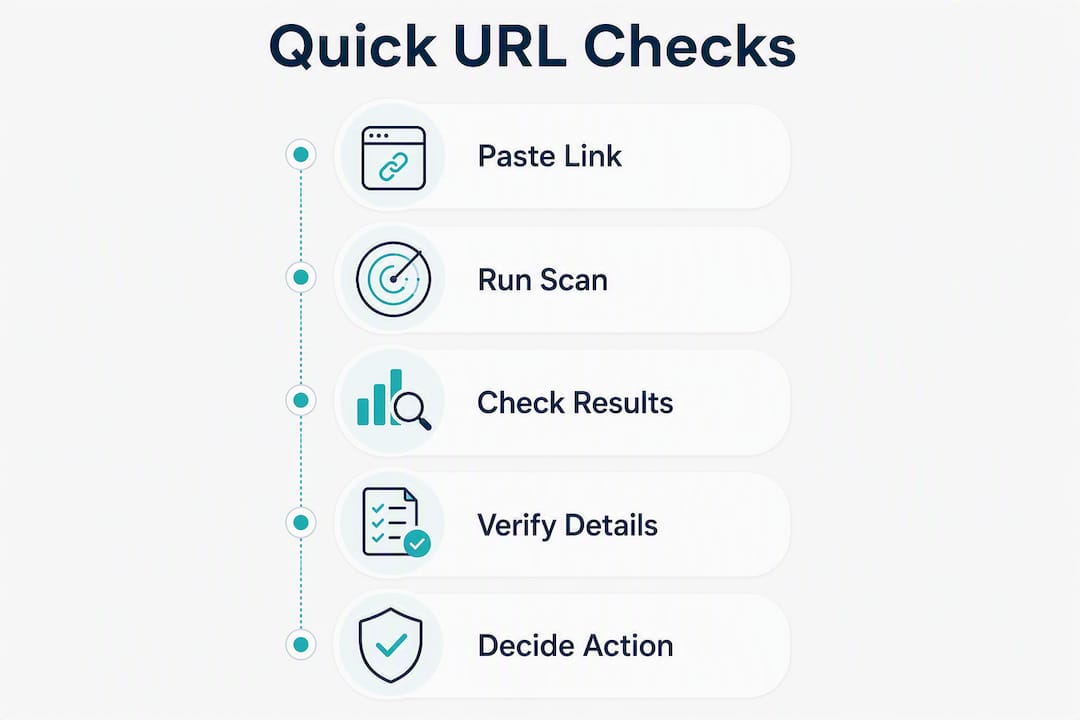
Paste the link into a free URL scanner before you click anything. That single step catches most known phishing pages, malware distribution sites, and scam redirects in seconds. If you want to move even faster, here are three things you can do right now:
-
Paste the URL into a scanner such as VirusTotal, Bitdefender Link Checker, or ESET Link Checker for an instant verdict.
-
Hover over the link (without clicking) to preview the actual destination in your browser’s status bar.
-
Never enter credentials or payment details on a page you arrived at through an unsolicited link, even if the scanner returns a clean result.
Those three steps cover most everyday situations. The rest of this guide explains how the tools work, where they fall short, and what to do if you already clicked something suspicious.
Table of Contents
How do URL scanners actually work?
When you paste a link into a scanner, the tool runs it through several checks simultaneously. Most scanners query a set of antivirus (AV) engines and threat-intelligence feeds, compare the domain against blacklists like Google Safe Browsing and PhishTank, and evaluate reputation signals such as domain age and hosting history. Better tools also follow redirect chains, which matters a lot for shortened links since the short URL itself is rarely the threat.
URLScans goes a step further: it follows each redirect hop, captures a screenshot at every stage, and cross-references multiple threat feeds. That screenshot feature is genuinely useful because it lets you see the final landing page without loading it in your browser.
What the verdict labels mean in practice:
-
Safe means no known threat was detected across the sources checked at that moment.
-
Suspicious usually means something looks off (a very new domain, unusual redirect behavior, or a low reputation score) but no confirmed malicious activity yet.
-
Malicious means one or more sources flagged the URL as a confirmed threat.
The catch is cached results. Many scanners store previous scan data and serve it back quickly rather than re-querying every source in real time. A brand-new phishing page created this morning may not appear in any blacklist yet, so it sails through with a clean verdict. ESET’s guidance frames scanners as a “fast trust-decision layer” rather than a guarantee, and that framing is accurate.
Tools that disclose how many detection engines or feed sources they use are a stronger signal of reliability than a bare “safe” label. If a scanner shows you exactly how many detection engines returned clean results, you have actual context. If it just says “safe,” you have a label.
Pro Tip: A passed scan is not a green light for high-risk actions. If a link is asking you to log in, pay, or confirm personal details, step away from the link and contact the organization directly through a phone number or website you already know.
Six fast manual checks before you click
Automated scans are fast, but they work best alongside a quick visual inspection. Run these in order:
-
Hover over the link. Before clicking anything, hover your mouse over it and look at the URL preview in your browser’s bottom-left status bar. On mobile, press and hold the link to see the destination. If the displayed text says “Amazon” but the URL shows a random string of characters, that mismatch is a red flag.
-
Inspect the domain for misspellings and subdomains. Attackers register domains like
paypa1.comoramazon-secure-login.com. The real domain is always the part immediately before the first single slash.login.amazon.comis Amazon’s domain;amazon.login-secure.comis not. -
Check the top-level domain (TLD). Your bank does not send links ending in
.xyz,.top, or.ru. Unusual TLDs on familiar brand names are a reliable warning sign. -
Expand shortened links before interacting. Services like Bit.ly or TinyURL hide the final destination. Paste the shortened URL into a scanner that follows redirects and captures screenshots at each hop rather than clicking through blind. This is the single most important step for links shared on social media or in text messages.
-
Run the URL through a scanner. Use one of the tools covered in the next section. ESET recommends combining the scanner result with a manual inspection of domain spelling, legal pages, and contact details for anything involving sensitive actions.
-
Pause if the message pressures you. “Your account will be suspended in 24 hours” and “Claim your prize before midnight” are pressure tactics. Legitimate organizations do not demand immediate action through unsolicited links. That urgency is the attack.
If a link still looks suspicious after these checks, report it to the sender’s platform (email provider, social network, or messaging app), block the sender, and verify the situation by contacting the organization through a channel you trust independently.
Which free URL scanner should you use?
Each tool below has a distinct strength. Pick based on what matters most for your situation.

Quick tool summaries
VirusTotal aggregates results from over 70 AV engines and threat feeds, making it the most transparent option for seeing exactly which sources flagged a URL. Scan records are public by default, so avoid pasting sensitive internal URLs.
NordVPN Link Checker is a clean, no-signup paste-box tool aimed at everyday users who want a fast verdict without creating an account. Good for quick checks when you don’t need deep detail.
SafeToOpen focuses on real-time analysis and is designed to catch phishing pages that have not yet made it onto standard blacklists. Useful when you suspect a very new threat.
ESET Link Checker returns instant verdicts with no sign-up required and is backed by ESET’s threat intelligence database. Straightforward and reliable for everyday use.
Bitdefender Link Checker offers a simple paste-and-check interface, flags suspicious domain patterns and recently created sites, and is honest about the fact that no checker is 100% foolproof.
URLScan (urlscan.io) is the most detailed option. It follows redirect chains, captures screenshots at each hop, and checks multiple threat feeds including Safe Browsing and PhishTank. Best for shortened links or anything with multiple redirects.
Comparison at a glance
| Tool | Speed | Privacy | Detection sources | Ease of use | Real-time vs. cached |
|---|---|---|---|---|---|
| VirusTotal | Fast (seconds) | Public scan records by default | 70+ AV engines | Paste box, no signup | Mix of real-time and cached |
| NordVPN Link Checker | Very fast | No signup, no stated logging | Proprietary feeds | Paste box | Real-time |
| SafeToOpen | Fast | No signup required | Proprietary + heuristics | Paste box | Real-time focus |
| ESET Link Checker | Fast | No signup required | ESET threat intelligence | Paste box | Real-time |
| Bitdefender Link Checker | Fast | No signup required | Multiple sources | Paste box | Real-time |
| URLScan (urlscan.io) | Moderate (screenshot capture) | Public records; private mode available | Safe Browsing, PhishTank, more | Paste box + API | Real-time with screenshots |
Choosing the right tool for the moment:
- Want maximum detection coverage: — VirusTotal. Seventy-plus engines give you the broadest consensus, though the public scan record is a trade-off.
When scanners fail: red flags that still need your attention
Automated tools miss things. A phishing page launched an hour ago may not appear on any blacklist yet. Phishing sites routinely clone legitimate stores, add fake reviews, and use stolen branding to pass a casual glance. Here are the manual warning signs that should stop you regardless of what a scanner says:
-
Urgent payment or credential requests. Any unsolicited link demanding you log in or pay immediately is suspicious by design.
-
SSL padlock present but site looks wrong. A padlock only means the connection is encrypted. Phishing sites can and do obtain valid SSL certificates to appear trustworthy. HTTPS is not a safety guarantee.
-
Very new domain. A domain registered within the past few weeks is a strong indicator of a throwaway scam site. Domain age is one of the signals tools like LegitOrNot check alongside SSL validity, SPF/DMARC records, and external reputation.
-
Missing or fake contact and legal pages. Legitimate businesses have real, working contact pages and privacy policies. A site with no address, no phone number, and a generic “Contact Us” form that goes nowhere is a warning.
-
Homoglyphs and lookalike characters. Attackers substitute visually similar characters: a Cyrillic “а” for a Latin “a,” or a zero for the letter “O.” These are nearly invisible at normal reading speed.
-
Encoded or obfuscated URLs. A URL full of percent-encoded characters (
%2F,%40) or an unusually long string of random characters after the domain is often an attempt to hide the true destination. -
Weird subdomains on familiar brands.
secure.paypal.comis PayPal.paypal.com.secure-verify.netis not.
For any high-risk action (logging into a financial account, entering a Social Security number, making a payment), combine the scanner result with a manual check and verify the request through a separate, trusted channel before proceeding.
What to do immediately if you clicked a malicious link
Speed matters here. The faster you act, the less damage a bad click can cause.
-
Disconnect the device from the internet. Turn off Wi-Fi or unplug the ethernet cable. This cuts off any active communication between malware and a remote server.
-
Close the page immediately. Do not click anything on the page, including a “close” button that might trigger a download.
-
Change important passwords from a clean device. Use a different phone or computer. Prioritize email, banking, and any account that uses the same password as the one you may have entered.
-
Run a full antivirus or malware scan. Use a reputable security tool on the affected device before reconnecting it to the internet.
-
Check for unauthorized account activity. Review recent logins, transactions, and any email forwarding rules that may have been set without your knowledge.
-
Enable two-factor authentication (2FA) and consider a password manager. Both steps make it significantly harder for an attacker to maintain access even if they captured a password.
Reporting the incident:
-
File a complaint with the FTC at ReportFraud.ftc.gov.
-
Report cybercrime, including phishing and financial fraud, to the FBI’s Internet Crime Complaint Center (IC3) at ic3.gov.
-
Preserve evidence: take screenshots of the link, the message it arrived in, and any pages you saw. This helps investigators and your bank if a dispute arises.
If your finances were compromised, an account was taken over, or you see signs of ransomware (files renamed, a ransom note on screen), contact a professional immediately. Your bank’s fraud line and a local cybersecurity professional are the right calls at that point.
What scanners may log when you paste a URL
Free tools come with trade-offs. When you paste a URL into a public scanner, that URL may become part of a shared, searchable database. Some services publish scan results and metadata publicly, which means anyone searching for that URL later could find your scan record, including the timestamp.
Typical privacy behaviors to be aware of:
-
Public scan records: VirusTotal and URLScan both maintain public databases. A URL you scan can be found by other users.
-
Community-shared scans: Some tools use crowd-sourced data, meaning your submission contributes to a shared threat-intelligence pool.
-
API access and retention: Tools that offer API access often retain scanned URLs for a defined period as part of their service terms.
-
Optional private mode: URLScan offers a private scan option that keeps results out of the public index. Check a tool’s settings or FAQ before scanning anything sensitive.
What to look for in a privacy-conscious tool:
-
An explicit “no logging” or “no sign-up required” statement on the tool’s homepage.
-
A private or unlisted scan mode.
-
Clear terms about data retention and whether submissions feed a public database.
Pro Tip: Before scanning a URL that contains internal information (a company intranet link, a document URL with an access token), check the tool’s FAQ for its scan visibility settings. If public records are the default, use a tool with a private mode or strip any sensitive parameters from the URL first.
How Scruteon complements the tools you just learned about
URL scanners answer a single question: is this specific link known to be dangerous right now? What they don’t do is teach you to recognize the patterns behind the attack, understand why a particular scam works, or know what to do when the scanner returns a clean result on a link that still feels wrong.
That’s where Scruteon’s free scam-prevention newsletter fits in. Scruteon sends one to two emails per week covering real, active scams: phishing campaigns making the rounds, romance scam tactics, tech support fraud scripts, and elder fraud schemes. Each email is written in plain language, with no technical jargon, so it works whether you’re a daily smartphone user or someone who checks email once a week.
What regular readers get:
-
Early awareness of scam campaigns before they hit mainstream news.
-
Pattern recognition that makes suspicious links easier to spot without running a scan.
-
Guidance on escalation: when to report, who to contact, and how to help a family member who may have been targeted.
A scanner tells you about a URL. Scruteon tells you about the people behind it and how they operate. The two work better together than either does alone. If you’ve already encountered something suspicious and want a second opinion beyond automated tools, Scruteon’s free advice page lets you describe the situation and get a human response.
Key Takeaways
Paste any suspicious link into a free URL scanner first, then run the six manual checks before taking any action involving credentials or payment.
| Point | Details |
|---|---|
| Scan before you click | Paste the URL into VirusTotal, ESET, Bitdefender, or URLScan for an instant verdict in seconds. |
| Scanners have limits | Brand-new phishing pages may not be blacklisted yet; always combine a scan with manual inspection. |
| Shortened links need redirect-following | Use URLScan or a tool that follows redirects and captures screenshots to see the true destination. |
| Act fast after a bad click | Disconnect, close the page, change passwords from a clean device, and report to the FTC or IC3. |
| Scruteon adds ongoing awareness | The free Scruteon newsletter delivers weekly scam alerts that help you recognize threats before you encounter them. |
The habit that actually protects you
The tools in this guide are genuinely useful. But the readers who stay safest aren’t the ones who run the most scans. They’re the ones who pause before they click anything unexpected.
That pause is a habit, not a skill. You don’t need to know how AV engines work or what a homoglyph is. You just need a half-second of friction between receiving a link and acting on it. In that half-second, you hover, you glance at the domain, and you ask yourself whether you were expecting this. Most of the time, that’s enough.
Automated checks are helpful, but they work best when you’re already skeptical. A scanner that returns “safe” on a link you received out of nowhere, asking you to confirm your bank details, is not a reason to proceed. Layered vigilance means the scanner is one input, not the final word.
Stay ahead of scams with Scruteon’s free newsletter
URL scanners are a solid first line of defense, but they only work when you think to use them. Scruteon gives you something different: a steady stream of real-world scam intelligence delivered to your inbox, written in plain English, twice a week.
You’ll get early warnings on active phishing campaigns, clear explanations of how current scams operate, and practical steps to protect yourself and the people around you. No technical background required. No subscription fee. Just the information you need to stay one step ahead.
Sign up for free at Scruteon.com and start getting scam alerts that complement every scanner you use.
The information in this article is for educational purposes only. Scam tactics change fast, and we cannot guarantee that this information is always complete or up to date.
By reading this article, you agree that Scruteon is not responsible for any financial losses, fraud, or damages that occur if you rely on this content. This is not professional financial or legal advice. If you suspect you are a victim of a scam, please contact your bank or local law enforcement immediately.
Useful sources and reporting tools
-
VirusTotal — Aggregates 70+ AV engines; public scan records; best for maximum detection coverage.
-
URLScans — Follows redirects, captures screenshots; best for shortened links; private mode available.
-
FTC ReportFraud — File a complaint about phishing, scams, and fraud in the US.
-
FBI IC3 — Report cybercrime including phishing, financial fraud, and account takeover.