
Instagram scams are common, come in a lot of different forms, and they are not slowing down. If you clicked a suspicious link, got a strange DM promising money, or think someone hijacked your account, stop everything else and do this first: don’t send any money, don’t enter your login info anywhere unfamiliar, change your Instagram password immediately, turn on two-factor authentication, and log out of any sessions you don’t recognize.
Do this before you finish reading. Fraud losses reported to the Federal Trade Commission hit $12.5 billion in 2024, a sharp jump from prior years, and social platforms are a major delivery channel for that fraud.
-
Stop replying to the message or comment thread.
-
Never send gift cards, crypto, or wire payments to resolve an “account issue.”
-
Change your password now, using a phrase you’ve never used elsewhere.
-
Turn on app-based two-factor authentication in Settings.
-
Check Login Activity and log out any device you don’t recognize.
Meta’s own Scam Protection Center tells users the same thing: don’t click suspicious links, and lock down your account with two-factor authentication. If you’re still unsure whether something you saw is a setup, Scruteon’s free “Is this a scam?” service will look at it with you before you act.
Key Takeaways
Instagram scams succeed by combining urgency with a convincing impersonation, and stopping them requires acting fast on password changes, two-factor authentication, and reporting rather than debating whether the message is real.
| Point | Details |
|---|---|
| Never trust unsolicited DMs | Treat any unexpected message about prizes, account issues, or money as a red flag by default. |
| Enable app-based two-factor authentication | Authenticator apps or passkeys resist the SIM-swapping risks tied to SMS codes. |
| Verify before you click | Check “Emails from Instagram” in Settings and search brands independently instead of trusting links in DMs. |
| Act within hours, not days | Contact your bank and change passwords immediately if you suspect compromise, since fast action limits financial damage. |
| Report every incident | File with Instagram’s Scam Protection Center and the FTC so regulators can track and act on patterns. |
Table of Contents
Why Instagram Scams Are So Common
Instagram works well for scammers for the same reasons it works well for everyone else. Direct messages are instant, low-friction, and largely invisible to anyone but the sender and recipient. Anyone can follow anyone. And the platform’s culture runs on trust signals, like verified badges, follower counts, and polished photography, that are trivially easy to fake with a screenshot or a cloned bio.
Pew Research Center’s data on Americans’ social media use shows adoption spans nearly every age group, not just teenagers scrolling reels. That breadth is exactly what makes the platform such an efficient fraud channel: a scammer running the same script can plausibly target a college student, a retiree, and a small business owner all in the same afternoon.
Most scams follow a predictable sequence:
-
Contact: a DM, comment, or tagged post starts the conversation.
-
Redirect: the scammer pushes you off Instagram to a lookalike website, WhatsApp, or a “support” email.
-
Extraction: you’re asked for a password, a login code, or a payment.
Once you recognize that pattern, a huge share of Instagram scams start to look identical underneath the costume.
Common Instagram Scams and How They Actually Work
Instagram scams borrow from a fairly small playbook. The details change, the mechanics don’t. Here’s what each one looks like in practice.
Phishing and fake login pages
You get a DM or email claiming your account will be suspended, or that you’ve been reported for copyright violation, unless you “verify” immediately. The link leads to a page that looks exactly like Instagram’s login screen but isn’t. Type your password there and the scammer has it in seconds. If you have SMS-based two-factor authentication, some phishing kits will even prompt you to hand over that code on the fake page, giving the attacker everything needed for a full account takeover. Bitdefender’s breakdown of Instagram scams documents this exact fake-login pattern as one of the most persistent threats on the platform.
Fake giveaways and contests
A page impersonating a real brand (or a “lucky winner” account) tells you that you’ve won a prize, but you need to “verify your identity” by logging into a linked page, or pay a small shipping fee to claim it. Bitdefender’s giveaway scam research shows these campaigns are frequently just a front end for credential harvesting, using the excitement of “winning” to short-circuit normal caution.
Impersonation of brands, influencers, and support staff
Scammers clone a real account’s photo and name, change the username by a single character, and message that account’s actual followers offering deals, collaborations, or “official” support. Fake Instagram support accounts are especially effective because people assume Instagram would never message them first, and scammers exploit that assumption by doing exactly that.
Marketplace and fake product scams
You find a product on an Instagram shop page at a suspiciously good price. The seller asks for payment through a direct bank transfer, a payment app, or a link outside Instagram’s checkout, rather than through any protected purchase flow. There’s no delivery confirmation, no dispute process, and once the money moves, it’s gone.

Romance and investment scams
These build slowly. A new follower compliments your posts, starts a conversation, and over weeks builds what feels like a genuine relationship or friendship. Eventually the conversation turns to a “guaranteed” crypto trading platform or investment opportunity, often with a fabricated dashboard showing fake gains to keep you depositing more.
Fake jobs, loans, and subscription offers
A DM offers remote work paying suspiciously well for minimal effort, then asks for your Social Security number, banking details, or an upfront “training fee” or “equipment deposit” before you start. Loan scams follow the same shape: apply for a small personal loan, get approved instantly, then get told you need to pay an “processing fee” first.
Engagement bait and malicious comments
A post promises a free product, a shocking reveal, or an exclusive deal if you comment a specific word or click a link in a reply. The link routes to malware or another phishing page. It’s a low-cost, high-volume tactic that scammers run across thousands of posts at once.
Pro Tip: If a message tries to create panic or excitement in the same breath, that combination is one of the strongest red flags there is. Scammers use urgency to shrink your thinking time.
Red Flags and a Quick Verification Checklist
A handful of signals show up across almost every Instagram scam, no matter which category it falls into.
-
An unsolicited DM from someone you don’t know, especially one referencing money, prizes, or account problems.
-
Urgent language: “act within 24 hours,” “your account will be permanently deleted.”
-
A request to click a login link sent through DM rather than the app itself.
-
Any request for your password, a verification code, or an MFA code.
-
Payment requests involving gift cards, cryptocurrency, or wire transfers.
-
A username that’s almost identical to a real account, often with an extra underscore or a swapped letter.
-
A bio link that redirects somewhere unrelated to the account’s stated purpose.
When something feels off but you’re not sure, run it through a short verification process before doing anything else.
| Verification Step | What It Confirms |
|---|---|
| Check “Emails from Instagram” in Settings | Confirms whether Instagram actually sent you anything, since Meta only sends official mail from instagram.com, meta.com, or facebook.com domains, according to Instagram’s own help resources. |
| Search the brand or person independently | Confirms whether the account matches the organization’s real, publicly listed profile. |
| Hover or long-press a link without tapping | Reveals the actual destination URL before you commit to opening it. |
| Contact the brand through its official website | Confirms legitimacy without relying on any channel the scammer controls. |
Even if part of an interaction checks out, treat the whole thing as unsafe the moment any single red flag appears. A real support account will never need your password to “verify” you, and a real giveaway will never ask you to pay to receive a prize.
How to Lock Down Your Instagram Account
Fixing your account’s security takes maybe fifteen minutes, and it closes off the entry points scammers rely on most.
-
Turn on app-based two-factor authentication, using an authenticator app rather than SMS codes where possible. SIM-swapping makes text-message codes interceptable, and Kaspersky’s security guidance specifically recommends app-based codes or passkeys over SMS.
-
Use a password manager to generate and store a unique password for Instagram. If you’ve reused that password anywhere else, change it there too.
-
Audit your active sessions under Settings > Security > Login Activity, and log out anything you don’t recognize.
-
Review connected apps under Apps and Websites, and revoke access for anything you don’t remember authorizing.
-
Restrict who can message you by adjusting Message Controls, especially if you’re getting frequent unsolicited DMs.
-
Limit bio information like your email, phone number, or workplace, since scammers scrape bios to build convincing impersonation profiles.
-
Keep your phone’s operating system updated, avoid logging into Instagram on public Wi-Fi, and run a scan if you already clicked a suspicious link.
Pro Tip: Passkeys are becoming widely supported and remove passwords from the equation entirely. If Instagram offers passkey login on your account, turning it on closes off phishing almost completely, since there’s no password left to steal.
What to Do Immediately After Getting Scammed
If you already handed over a password, a code, or money, move through these steps in order, fast.
-
Change your Instagram password immediately, and change it anywhere else you’d reused it.
-
Enable two-factor authentication if it wasn’t already on, and log out every active session under Login Activity.
-
Remove any linked emails, phone numbers, or devices you don’t recognize from your account settings.
-
Contact your bank or card issuer right away if you sent money or shared financial details, and ask about disputing or reversing the charge.
-
Consider a credit freeze if you shared your Social Security number or other identity documents.
-
Report the account to Instagram through the Scam Protection Center, which routes phishing and impersonation reports to Meta’s trust and safety teams.
-
File a complaint with the FTC at ReportFraud.ftc.gov. That data feeds directly into the $12.5 billion in reported losses tracked in 2024, and every report helps regulators build cases against repeat offenders.
-
Save screenshots of everything, the DMs, the fake login page, the username, before the scammer deletes the account.
-
Warn your followers if the scammer accessed your account, since they may now be receiving messages that look like they’re from you.
If the loss involved a significant amount of money, or you suspect identity theft beyond the Instagram account itself, involve local law enforcement or a consumer protection attorney. Speed matters more than almost anything else here. Banks have far more leverage to reverse a transaction within the first 24 to 48 hours than a week later.
Scruteon’s Ongoing Support for Spotting New Instagram Scams
Scam tactics shift constantly, which is exactly why a one-time read of an article isn’t enough protection on its own. Scruteon sends 1 to 2 emails a week, each one breaking down a real scam that’s currently circulating, what it looks like, and the specific warning signs that gave it away.
-
Newsletter alerts cover romance scams, phishing, tech support fraud, and elder fraud in plain, no-jargon language.
-
Each email is built to be read in under two minutes, no technical background needed.
-
The free “Is this a scam?” advice service lets you send a screenshot, a message, or a link you’re unsure about and get a direct read on whether it’s a setup.
Scam recognition isn’t a one-time skill you learn and keep forever. Attackers rewrite their scripts constantly, and the version circulating this month rarely looks like the version from last year. Staying current matters more than memorizing a fixed list of red flags.
If you’ve ever hesitated over a DM wondering “is this real,” that hesitation is worth acting on. Send it to Scruteon before you respond to it yourself.
Subscribe to the Scruteon newsletter for ongoing alerts, and browse the full scam prevention guide for coverage well beyond Instagram, including romance scams and tech support fraud that often start on the very same platform.
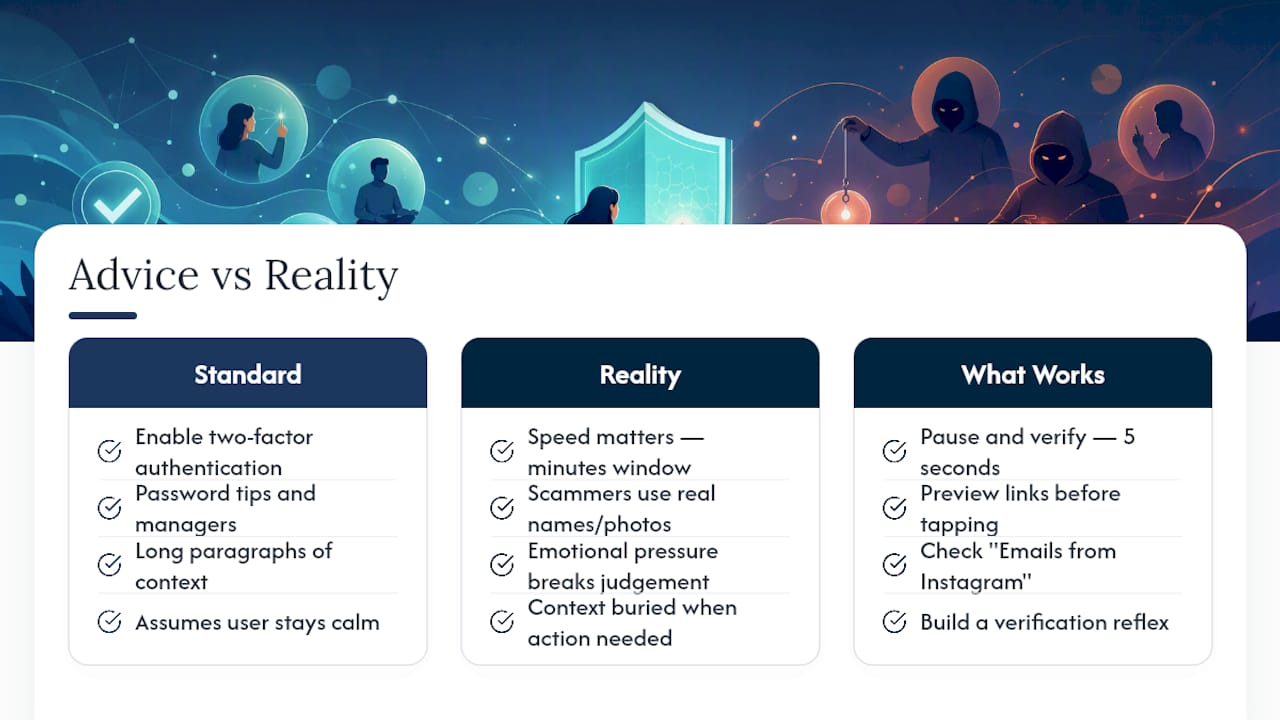
The Gap Between Standard Advice and What Actually Works
Most guides to Instagram scams read like checklists written by someone who’s never had to act on them under pressure. “Enable two-factor authentication” is correct advice, but it’s not the part that matters most in the moment. What matters is speed. The window between clicking a bad link and a scammer draining a linked payment method is often measured in minutes, not days, and every guide that buries the “act now” steps under paragraphs of context is failing the reader at the exact moment they need clarity most.
The other gap is emotional, not technical. People assume they’d never fall for something this “obvious” until they’re mid-conversation with a fake support account that’s already using their real name and profile photo. Confidence isn’t protection. A verification habit is. That’s the entire logic behind checking “Emails from Instagram” or previewing a link before tapping it: it removes the decision from an emotionally charged moment and turns it into a five-second mechanical check.
If there’s one thing worth prioritizing above every password tip in this article, it’s building the reflex to pause and verify before reacting. Everything else, MFA, password managers, session audits, is defense in depth. That pause is the first line.
This article is general information, not a substitute for advice from a qualified financial advisor. Consult a qualified financial professional about your own circumstances before acting on anything here.
The information in this article is for educational purposes only. Scam tactics change fast, and we cannot guarantee that this information is always complete or up to date.
By reading this article, you agree that Scruteon is not responsible for any financial losses, fraud, or damages that occur if you rely on this content. This is not professional financial or legal advice. If you suspect you are a victim of a scam, please contact your bank or local law enforcement immediately.
Sources
-
New FTC data show big jump reported losses to fraud — $12.5 billion in 2024
-
Instagram scams in 2026 - How to spot, stop & protect against every major threat