Smishing is phishing carried out over text message instead of email, and the single most important thing to do when a suspicious text arrives is simple: don't tap the link, don't reply, and verify the claim yourself using a phone number or website you already trust. Treat every unexpected text with a link or urgent request as hostile until you've confirmed otherwise. The stakes are real: stolen login credentials, malware on your phone, and direct financial loss.
TL;DR:
- Most smishing campaigns now leverage real-time, disposable infrastructure like burner numbers and email-to-SMS gateways to evade detection and rapid takedown.
- Recognizing common scam patterns such as urgent account alerts, fake delivery notices, and MFA hijacking helps prevent clicking or replying to malicious messages.
- Switching to authentication apps or hardware keys for two-factor authentication significantly reduces the risk of MFA-related smishing attacks.
- Reporting suspicious texts promptly to 7726, the FTC, and the FBI helps block malicious campaigns before they can cause widespread harm.
- Updating phone software, enabling carrier spam filtering, and verifying claims independently are key steps to lower smishing vulnerability.
Table of Contents
- What Is a Smishing Scam, and Why Is It Growing So Fast?
- How Do Smishing Attacks Actually Work?
- What Do Real Smishing Scams Actually Look Like?
- How Do You Spot a Smishing Message Before You Click?
- What Should You Do If You Clicked, Tapped, or Replied?
- What Prevention Steps Actually Reduce Your Risk?
- Where Should You Report a Smishing Text?
- Smishing and Its Free Weekly Alerts
- Smishing vs. Phishing vs. Vishing: What's the Real Difference?
- What's New in Smishing Tactics Right Now?
- Sources
- FAQ
What Is a Smishing Scam, and Why Is It Growing So Fast?
A smishing scam is a fraudulent text message designed to trick you into clicking a malicious link, downloading malware, or handing over personal information. The name blends "SMS" and "phishing," but the mechanics differ from email in one important way: SMS has almost none of the filtering infrastructure that email providers built over two decades.
Gmail and Outlook scan attachments, flag spoofed domains, and quarantine known bad senders before a message ever reaches your inbox. Your phone's messaging app does none of that by default. That gap shows up directly in behavior.
By the numbers: SMS click-through rates run between 8.9% and 14.5%, compared to roughly 2% for email, according to IBM. Scammers know texts get opened and trusted faster than email, which is exactly why they've shifted resources into this channel.
The financial toll backs that up. The FTC and independent researchers tie a substantial amount of consumer losses have been tied to scams that started with a text message recently. That's not a fringe threat. It's a mainstream fraud channel that happens to arrive in the same app you use to text your family.
How Do Smishing Attacks Actually Work?
Every smishing message leans on a handful of psychological triggers, then backs them up with technical tricks designed to survive just long enough to catch victims before anyone shuts the campaign down.
On the social engineering side, scammers manufacture urgency ("your account will be suspended in 24 hours"), borrow authority (posing as your bank, the IRS, or a delivery carrier), and lean on fear or curiosity (a fake unpaid toll, a "prize" you never entered to win). Brand impersonation is the connective tissue. A text claiming to be from Chase or FedEx feels more credible than one from an unknown sender, so scammers spoof logos, sender names, and even shortcodes to mimic real institutions.
The infrastructure behind these messages is built to dodge detection:
- Spoofed caller IDs and shortcodes that mimic legitimate business numbers
- Email-to-SMS gateways that let attackers send texts without owning a real phone number, a tactic the FCC has flagged
- Burner numbers and disposable SIMs that get discarded after a single campaign.
- Malicious landing pages cloned to look like real bank or delivery sites, often live for only hours before takedown
One of the most dangerous variants targets multi-factor authentication directly. A scammer who already has your password will text you asking you to "confirm" or forward a one-time code, hijacking the exact security layer meant to stop them. That's a core reason CISA and the FBI have pushed people toward MFA methods that don't rely on text messages at all.
What Do Real Smishing Scams Actually Look Like?
Most smishing messages fall into a short list of recurring scripts. Recognizing the pattern matters more than memorizing exact wording, since scammers rotate phrasing constantly.
- Bank or account alerts. "Unusual activity detected on your account. Verify your identity here." The link leads to a cloned login page built to harvest your credentials the moment you type them in.
- Package delivery scams. A fake notice from "USPS" or "FedEx" claims a package is held pending a small redelivery fee, sending you to a payment page that captures your card details.
- Unpaid toll or fine messages. These spiked hard in recent years, impersonating state tolling agencies like E-ZPass with a link to "settle your balance immediately."
- Tech support and prize scams. A text says your device has been compromised or that you've won a gift card, both funneling you toward either a fake support line or a data-harvesting form.
- MFA code hijacking. You get a real login code because a scammer already has your password, then a second text or call asking you to "confirm" it.
- Long-con confidence schemes. A friendly "wrong number" text that evolves over days into a relationship, eventually leading to investment or money requests.
Every one of these hinges on the same move: get you to click, reply, or share information before you've had time to think it through.
How Do You Spot a Smishing Message Before You Click?
A few seconds of scrutiny catches most smishing attempts. Run any unexpected text through this checklist before you touch anything.
- Check the link itself. Shortened URLs (bit.ly, tinyurl), misspelled domains ("arnazon" instead of "amazon"), or odd top-level domains (.xyz, .top) are red flags.
- Look at the sender format. A random 10-digit number or an email address texting you instead of a recognizable shortcode is suspicious, especially if it claims to be a major bank or carrier.
- Any request for a code, password, or money is a warning sign. Legitimate institutions never ask you to text back a one-time passcode or gift card number.
- Notice the pressure. Real institutions rarely demand action within minutes. Manufactured urgency is a manipulation tactic, not a policy.
- When in doubt, verify independently. Open the bank's app directly or call the number printed on your card, never the number in the text itself, as the FCC recommends.
Pro Tip: If you receive a one-time login code you didn't request, do not share it with anyone, no matter who they claim to be. That code showing up unprompted almost always means someone already has your password and is one step from taking over your account.
What Should You Do If You Clicked, Tapped, or Replied?
Acting fast limits the damage. Work through these steps in order, starting the moment you realize you interacted with a suspicious text.
- Stop immediately. Close the message, don't enter any further information, and don't reply, even to say "stop." Replying confirms your number is active and can increase future spam and scam volume.
- Switch to a separate, trusted device. Change passwords for any account that might be exposed, and revoke active sessions or logged-in devices where the option exists.
- Contact your bank or card issuer right away if you entered financial information, so they can watch for or block fraudulent charges.
- Report the message. Forward it to 7726 (SPAM), file a complaint with the Reportfraud, and submit details to the IC3 if money or identity theft is involved.
- Consider a credit freeze or fraud alert with the major credit bureaus if you shared a Social Security number, and look into identity recovery services if the exposure is significant.
Speed matters more than most people realize. Researchers tracking smishing infrastructure note that many victims land on fraudulent pages within hours of a campaign launching, which is exactly why fast reporting helps get malicious domains blocked before the next wave of texts goes out.
What Prevention Steps Actually Reduce Your Risk?
Most smishing prevention advice sounds abstract until you turn it into concrete settings changes. Here's what actually moves the needle.
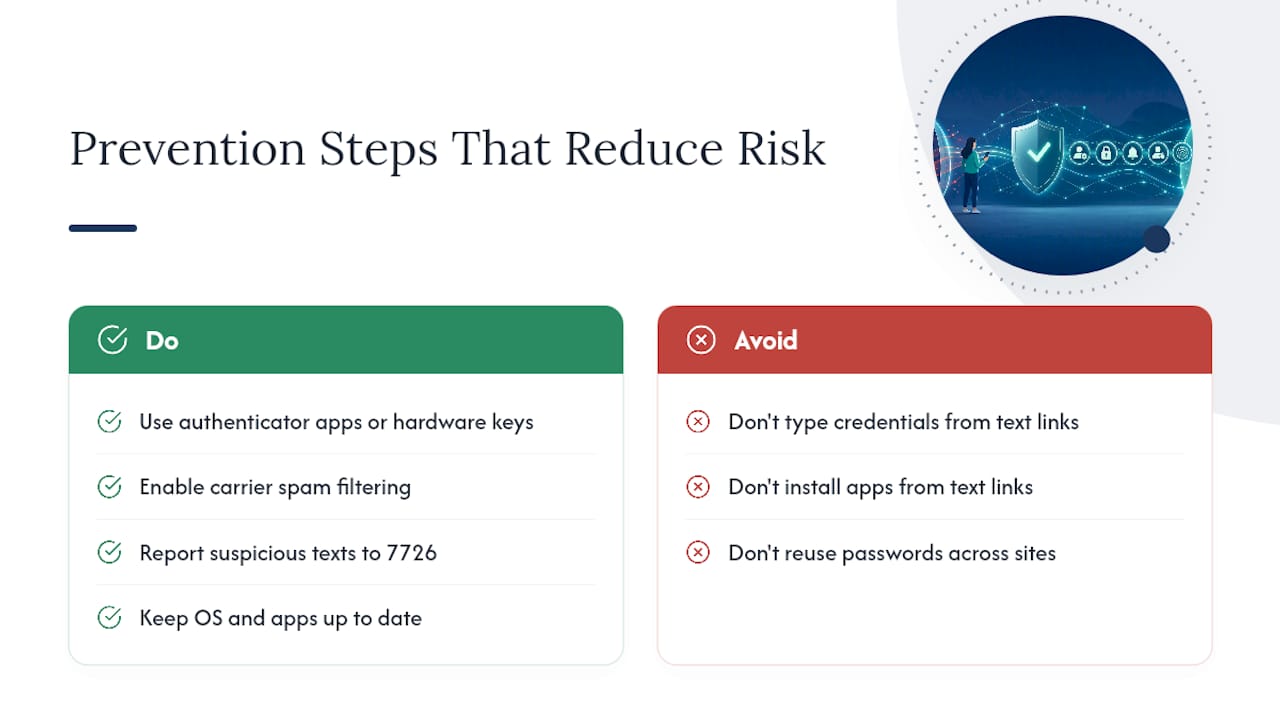
Ditch SMS-based two-factor authentication where you can. Text message codes can be intercepted or socially engineered out of you, which is why CISA and the FBI recommend authenticator apps, passkeys, or hardware security keys instead. A tool like Well-Check can help you set up stronger authentication habits if you're not sure where to start.
Turn on your carrier's spam filtering. All major US carriers offer free spam protection features, and reporting suspicious texts to 7726 (SPAM) helps them flag active campaigns faster.
Keep your phone's operating system and apps current. Security patches close the exact vulnerabilities that malicious links try to exploit, and outdated software is an easier target.
Never install an app or type credentials into a page reached through a text link. Go directly to the official app store or type the company's known web address yourself.
Log in through official apps or bookmarked portals only, and independently verify anything a text claims before acting on it. If a scammer already had your password, understanding how credential stuffing works helps explain why reusing passwords across sites makes this so much worse.
Block repeat senders the moment you confirm a number is fraudulent, even though scammers frequently rotate numbers to get around this.
Pro Tip: Set your phone to filter messages from unknown senders into a separate list. It won't stop smishing outright, but it buys you a second of hesitation before an urgent-sounding text gets your full attention.
Where Should You Report a Smishing Text?
Reporting does more than vent frustration. It feeds directly into the systems that get fraudulent numbers blocked and malicious websites taken down before more people fall for the same message.
- Forward the text to 7726 (SPAM). This goes straight to your carrier and flags the sending number for review.
- File a report with the FTC at reportfraud.ftc.gov, which tracks patterns across scam campaigns nationwide.
- Submit a complaint to the IC3 (the FBI's Internet Crime Complaint Center) if the scam involved financial loss or identity theft.
- Contact your bank or card issuer directly if you shared financial details, even if you're not sure anything was charged yet.
When you report, capture as much as you can: the full message text, the sender's number, the time you received it, and screenshots of any link or landing page you clicked. That detail is what helps investigators connect one text to a larger campaign.
Smishing and Its Free Weekly Alerts
A newsletter sends regular short emails breaking down real scams as they surface, smishing included, written in plain language for readers who don't want a security lecture. Each one covers a real example, the warning signs that gave it away, and the specific step to take if it lands in your own inbox or phone.
Subscribing costs nothing and takes one form field. If staying a step ahead of the next wave of text scams sounds useful, a newsletter is built exactly for that.
Smishing vs. Phishing vs. Vishing: What's the Real Difference?
All three are branches of the same fraud tree: someone impersonates a trusted source to steal information or money. The difference is the channel, and each channel plays to a different weakness.
Phishing happens over email and remains the broadest category, often carrying malicious attachments or links, and benefiting (for defenders) from decades of spam filtering.
Smishing happens over text message and exploits the fact that people trust texts more and read them faster, with almost no filtering layer standing in the way.
Vishing happens over a phone call, usually voice, where a scammer impersonates a bank representative, government official, or tech support agent in real time to pressure you verbally.
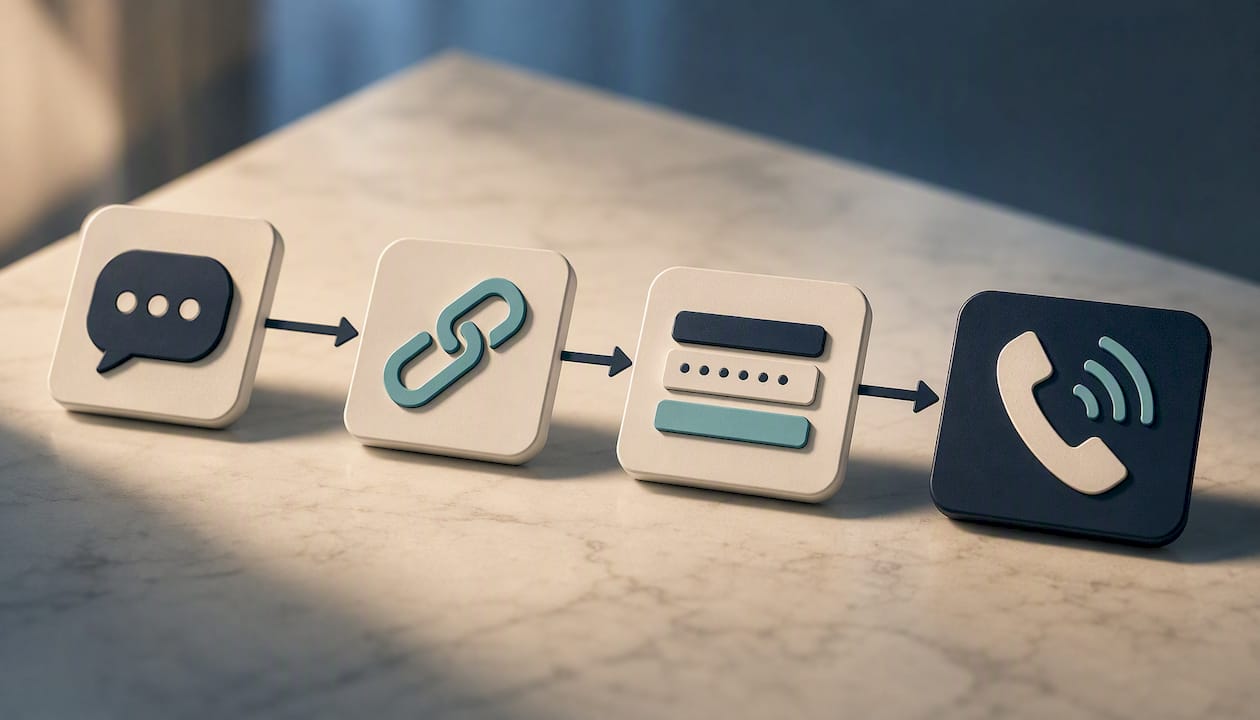
The overlap matters more than the labels. A single scam often chains all three: a smishing text with a fake "your card is locked" alert leads to a phishing landing page that harvests your login, and when that fails, a vishing call follows up pretending to be your bank's fraud department confirming "suspicious activity." Attackers don't think in channels. They think in whatever sequence gets a victim to comply, and increasingly that means combining SMS, email, and voice calls in the same campaign.
What's New in Smishing Tactics Right Now?
Smishing campaigns have gotten faster to launch, harder to trace, and more convincingly localized than they were even a couple of years ago.
Toll and fine impersonation scams (fake E-ZPass or state DMV messages) have become one of the most reported categories, largely because they're cheap to run at scale and easy to localize by state. Attackers also increasingly chain smishing with MFA hijacking: they buy or phish a password first, then text the victim asking them to forward the login code that arrives moments later, turning a security feature into the attack's final step.
Infrastructure has gotten more disposable too. Email-to-SMS gateways and burner numbers let a scammer stand up a new sending identity in minutes, which is part of why commercial anti-smishing filters only catch a fraction of threats before they reach a phone. Landing pages cloned to mimic banks or delivery carriers now often survive only hours before takedown, which is precisely why fast reporting to your carrier and the FTC matters as much as spotting the scam in the first place.
Sources
- What Is Smishing (SMS Phishing)? - IBM
- Avoid the Temptation of Smishing Scams - FCC
- Report Fraud | FTC
- Short Message Service (SMS) Phishing Attacks and Defenses: A Systematic Review - arXiv
FAQ
What Are Examples of Smishing Scams?
Common examples include fake bank fraud alerts asking you to "verify" your account, package delivery notices demanding a redelivery fee, unpaid toll or fine messages, prize or refund scams, and texts asking you to forward a one-time login code.
What Happens If You Click on a Smishing Text?
Clicking can take you to a cloned login page designed to steal your credentials, or in some cases trigger a malware download onto your device. If you clicked, change your passwords from a separate device and watch your financial accounts closely.
What Happens If I Reply to a Smishing Text?
Replying, even with "STOP," confirms to scammers that your number is active, which can increase future spam and scam attempts rather than reduce them. The safest move is to never respond at all.
How Do I Stop Smishing Text Messages?
Forward suspicious texts to 7726 (SPAM), enable your carrier's spam filtering, and block repeat senders. Switching from SMS-based two-factor authentication to an authenticator app or hardware security key also removes one of the main reasons scammers target your number in the first place.
Recommended
- Prevent Identity Theft: 3 Actions That Block Most Takeovers
- What to Do When You Get a Microsoft Phishing Email
- Never Share This Google Voice Verification Code With Anyone
- The One Ring Scam: Why You Should Never Call Back
The information in this AI-assisted-generated article is for educational purposes. Scam tactics change fast, and we cannot guarantee that this information is always complete or up to date.
By reading this article, you agree that Scruteon is not responsible for any financial losses, fraud, or damages that occur if you rely on this content. This is not professional financial or legal advice. If you suspect you are a victim of a scam, please contact your bank or local law enforcement immediately.