
An attacker asks you for a 6-digit code that Google just texted you, and if you send it, they use it to link your phone number to a Google Voice account they control. That’s the entire scam. The single action that stops it cold: never share, read aloud, or forward a verification code you didn’t request, no matter who’s asking or why.
Two versions show up constantly. A “buyer” on a marketplace listing asks you to “verify you’re real” by texting them a code. A stranger claims to have found your lost pet and needs to “confirm your number” the same way. The Identity Theft Resource Center documents this as a recurring pattern across marketplace sales, rental ads, and lost-pet posts.
-
If you didn’t request a code, don’t share it. Full stop.
-
Keep the conversation inside the platform’s messaging system, not text or phone.
-
Assume any urgent request for a “verification” code is the scam itself, not a step toward a sale.
A pattern worth remembering: Google Voice scams involving verification codes are consistently flagged by the FTC as one of the most common ways sellers on classifieds sites get their phone numbers hijacked.
Key Takeaways
The Google Voice verification-code scam only works because a victim voluntarily shares a code, so refusing to share any unexpected code stops the scheme before it starts.
| Point | Details |
|---|---|
| Never share codes | Refuse to text, forward, or read aloud any 6-digit code you didn’t personally request. |
| Stay on-platform | Keep marketplace, rental, or dating conversations inside the app’s messaging system, not text or phone. |
| Act fast if compromised | Use Google’s reclaim flow, change your password, and switch to authenticator-app two-factor immediately. |
| Report to multiple channels | File with the FTC, IC3, and ITRC so patterns get tracked and other consumers get warned. |
| Check accounts regularly | Review Google’s security dashboard monthly for unfamiliar activity or unrequested codes. |
Table of Contents
How the Google Voice Scam Actually Works
The mechanics are almost boringly simple, which is exactly why the scam works so well.
-
The scammer picks a target, usually someone posting an item for sale, a rental listing, or a “lost pet” notice with contact info attached.
-
They initiate a Google Voice signup using your phone number, which triggers Google to send a real 6-digit verification code to your phone by text.
-
They contact you with a plausible reason to need that code, often framed as verifying you’re a legitimate seller or confirming your identity before a deal.
-
You share the code, thinking you’re helping close a sale or reunite a pet with its owner.
-
The attacker enters your code on their end, finishing the Google Voice setup and linking your number to an account they now fully control.
At no point does this require hacking anything. The FTC’s breakdown of the scam makes clear the code itself is legitimate. It’s genuinely sent by Google to your phone. The theft happens the moment you hand it over voluntarily.
Once the setup finishes, the attacker can use that new Google Voice number to mask their real identity while contacting other victims, sometimes running the exact same scam on someone else using your phone number as the front.
Pro Tip: If you receive a 6-digit code you didn’t request, that’s your only warning. Legitimate services never ask you to read a code back to them. If someone does, the conversation is the scam.
Who Do Google Voice Scammers Target?
Scammers go where strangers already expect to exchange contact information with people they’ve never met, which makes normal caution feel out of place.
-
Marketplace and classifieds sellers on sites where buyers routinely message about items, giving scammers a built-in excuse to ask for “verification.”
-
Lost-pet post responders, where the emotional urgency of a missing animal short-circuits normal skepticism.
-
Rental listing respondents, where a “verified tenant” pretext feels routine.
-
Dating app users, where a new match asking to “confirm you’re not a bot” sounds plausible.
The FTC notes the common thread across all these scenarios is the same manufactured urgency: a reason to move fast, paired with a reason to trust the request.
What Can Someone Do With a Stolen Google Voice Number?
A hijacked number gives an attacker a working phone identity that isn’t theirs, and that’s more useful to a scammer than it might sound.
They can make outgoing calls and send texts that appear to come from your number, letting them contact other potential victims while hiding behind your identity. AARP’s reporting on these scams confirms attackers frequently reuse hijacked numbers to run the same scheme on new targets, multiplying the damage from a single stolen code.
-
Impersonate you in scam messages sent to strangers.
-
Receive forwarded calls or texts tied to that number, including some verification flows for other accounts.
-
Use the number as a disposable front, discarding it once it’s reported or shut down.
What it usually can’t do: take over your physical device, drain your bank account directly, or access your email without a separate breach. The real danger is escalation. A scammer with a working masked number has a tool for running follow-up social engineering, not a master key to your entire digital life.
How to Protect Yourself From a Google Voice Code Scam
The good news is this scam has an obvious weak point: it only works if you cooperate. Cut off that cooperation and the entire scheme collapses.
-
Never share a verification code with anyone, regardless of the story attached. Google and legitimate platforms never ask you to text or read back a code.
-
Keep all communication on the platform, whether that’s Facebook Marketplace, Craigslist, or a dating app’s messaging system. Scammers push you toward text or phone specifically because it’s harder to report and easier to hide behind.
-
Prefer in-person exchanges or verified payment methods for local sales. Avoid wiring money or gift cards, which are essentially untraceable once sent.
-
Switch critical accounts to authenticator apps instead of SMS-based codes. Apps like Google Authenticator or Authy generate codes locally on your device, so there’s nothing for a scammer to intercept by asking.
-
Use strong, unique passwords for your Google account and anything tied to it, so a single leaked password doesn’t cascade into multiple compromises.
-
Vet unfamiliar buyers and posters before engaging further. A reverse image search on their profile photo and a glance at how old their account is can reveal a scam pattern fast.
The FBI’s guidance on these scams echoes the same core advice: never share codes, favor verified payment processors, and treat any request to move off-platform as a warning sign rather than a normal part of doing business.
Pro Tip: If a “buyer” insists on texting you before discussing the item further, that’s backwards. Real buyers ask about the product. Scammers ask about your phone.
What to Do If You Already Shared a Verification Code
Move fast. The window between sharing a code and an attacker finishing setup is short, and quick action limits the damage.
-
Visit Google’s reclaim and disconnect pages and follow the “take your number back” flow described in Google’s support community to disconnect the fraudulent link and recover your number.
-
Change your Google account password immediately, and enable two-factor authentication using an authenticator app on a separate device, not SMS.
-
Review connected devices and recent account activity inside your Google account settings, disconnecting anything you don’t recognize.
-
Contact your bank if you’ve received any suspicious verification texts or transaction alerts tied to financial accounts, since attackers sometimes chain a phone hijack into a broader fraud attempt.
-
Save everything: screenshots of messages, timestamps, and the phone number or profile the scammer used. You’ll need this for reporting.
If Google’s automated reclaim process stalls, notifying your bank to require app-based verification rather than phone-based verification adds a layer of protection while you wait. Document every step. It matters if you need to escalate the report later.
-
Set a reminder to check your credit report over the following weeks.
-
Keep your evidence file until you’ve confirmed the number is fully reclaimed.
Where to Report a Google Voice Scam
Reporting does two things: it may help you recover losses, and it feeds data that helps investigators spot patterns across victims.
-
File at Reportfraud, including the phone number used, any messages, and the platform where contact started.
-
Report to IC3.gov, the FBI’s Internet Crime Complaint Center, especially if money changed hands.
-
Log the incident with the Identity Theft Resource Center or BBB Scam Tracker to help other consumers spot the same pattern.
-
Contact local police if you lost money directly, since some jurisdictions require a police report for bank disputes.
-
Use Google’s own support channels for the technical reclaim process itself.
How Scruteon Helps You Spot the Next Variant
Scam scripts change constantly. The “lost pet” pretext didn’t exist a few years ago, and the next twist on this scheme is probably already circulating somewhere.
Scruteon publishes one to two short scam alerts a week, breaking down new schemes like this one in plain language, no technical background required. If you get a message that feels off but you can’t quite place why, the free advice channel gives you a second opinion before you respond. It’s built for exactly this moment: the pause before you hit send on a code you’re not sure about.
How to Spot a Google Voice Phishing Attempt
Phishing attempts tied to Google Voice rarely look like the crude “you’ve won a prize” scams of a decade ago. They’re conversational, patient, and tailored to whatever you just posted online.
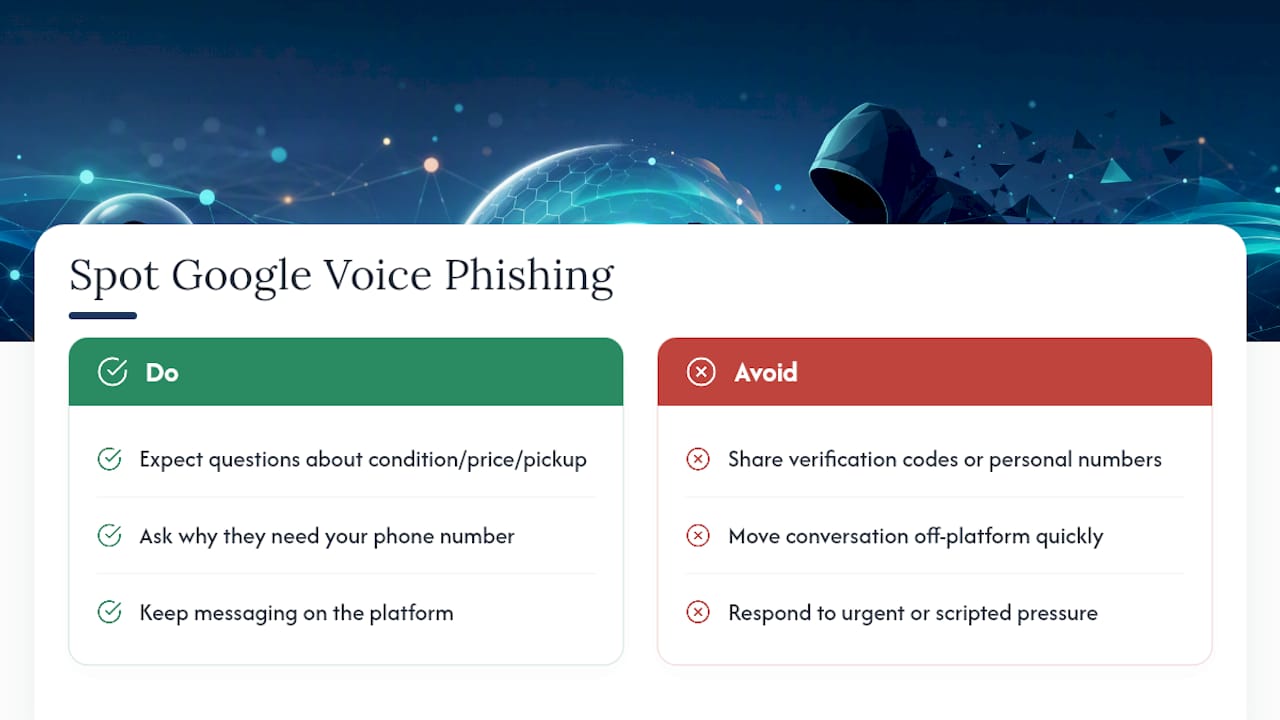
Watch for a message that arrives suspiciously fast after you list an item, especially one that skips small talk and jumps straight to asking for a phone number or a “verification” step. A real buyer usually asks about condition, price, or pickup logistics first. A phishing attempt often short-circuits that entirely.
Language mismatches matter too. If someone claims to be a local buyer but writes with phrasing that feels stiff or overly formal, or if their urgency escalates the moment you hesitate, that’s a script, not a conversation. The FTC’s own description of the scam notes the pretext is almost always framed as helping you, confirming you’re trustworthy, verifying you’re not a bot, protecting the transaction, when in reality it’s the opposite. You’re the one being tested for compliance, not the other way around.
A second pattern: the request to move off the platform. Craigslist, Facebook Marketplace, and most classifieds apps have built-in messaging for a reason. When a “buyer” insists on switching to text messages within minutes of first contact, ask yourself why a stranger would need your personal phone number before even confirming they want the item. That single question deflates most of these attempts before they go any further.
The Role of SIM Swapping in Google Voice Fraud
SIM swapping and Google Voice scams solve a similar problem for attackers, controlling a phone number that isn’t theirs, but they use different methods to get there.
A SIM swap involves an attacker convincing your mobile carrier to transfer your phone number to a SIM card they control, often through social engineering aimed at customer service reps or a bribed insider. Once that transfer happens, they receive your actual texts and calls directly, including any verification codes meant for you.
The Google Voice verification scam skips the carrier entirely. Instead of convincing your carrier to hand over your number, the attacker convinces you to hand over a single code voluntarily. It’s a lower-effort version of the same goal: control over a phone number for verification purposes.
The two threats can compound each other. If an attacker successfully SIM swaps your number, they can then use it to intercept legitimate verification texts for other accounts, including a Google Voice setup, without ever contacting you directly. Protecting against SIM swapping means adding a PIN or passcode requirement with your mobile carrier for any account changes, and avoiding using your phone number as the only recovery method for sensitive accounts. Carriers like Verizon, AT&T, and T-Mobile all offer account PINs specifically to block unauthorized SIM transfers, and setting one costs nothing.
What Google Voice Actually Protects Against, and What It Doesn’t
Google Voice includes real security features. It requires that 6-digit verification step specifically to prevent someone from linking a phone number they don’t control. The problem isn’t the security feature. It’s that the feature depends entirely on the human holding the phone to keep the code private.
That’s the core vulnerability, and it’s not unique to Google Voice. Any system that sends a one-time code to confirm ownership assumes the recipient won’t voluntarily hand it to a stranger. Google can’t distinguish between you legitimately setting up your own account and you being manipulated into helping someone else set up an account using your number. The code arrives the same way either time.
Google Voice also doesn’t verify who’s asking you for the code, only that the code reaches the phone number tied to the setup attempt. There’s no built-in warning that says “a stranger is trying to use your number right now,” which is exactly the gap scammers exploit. The security feature works exactly as designed. The scam works by targeting the one part of the system that isn’t automated: your judgment in the moment someone asks.
How to Check for Unauthorized Google Voice Activity
Catching a hijack early gives you a much better shot at reclaiming your number before an attacker uses it extensively.

Check your Google Account’s security page periodically, looking specifically at recent security activity and connected devices. If you never set up Google Voice yourself, any Voice-related activity listed there is an immediate red flag worth investigating that day, not next week.
Watch your phone for verification codes you didn’t request. A single unexpected 6-digit text is the earliest possible signal, often arriving before any account is fully compromised. If you get one, don’t dismiss it as spam. Check whether anyone has recently asked you for a code, even in an unrelated conversation.
Review your call and text history for unfamiliar forwarding behavior, missed calls from numbers you don’t recognize responding to messages you never sent, or contacts mentioning they received strange texts “from you.” These are downstream signs that a linked number is already being used.
Set a recurring reminder, monthly is reasonable, to glance at your Google Account’s security dashboard the same way you’d check a bank statement. It takes under a minute and catches problems while they’re still small.
Securing Your Accounts After a Google Voice Hijack
A compromised Google Voice number doesn’t just threaten a phone line. It threatens every account that treats that number as a recovery or verification method.
Start with your core Google account, since that’s the account tied directly to Voice. Change the password immediately, choosing something unique you haven’t reused anywhere else, and enable two-factor authentication through an authenticator app rather than SMS, since SMS-based codes are exactly the attack surface you’re trying to close.
Then work outward. Check any account, banking, email, social media, that lists your phone number as a recovery option or two-factor method. If your Google Voice number was ever used for account recovery elsewhere, an attacker with access to that number could attempt to reset passwords on those accounts too. AARP recommends treating this as a full security review, not a single fix, precisely because the exposure can ripple outward from one hijacked number.
Update recovery email addresses and phone numbers on every account that matters, prioritizing banking, primary email, and any account holding stored payment information. Remove the compromised number as a recovery option everywhere it appears, replacing it with a number you’re confident is still fully yours.
Real Google Voice Scam Cases Worth Knowing
The scenarios reported to consumer-protection groups follow a narrow set of scripts, which is oddly reassuring once you recognize the shape.
One common case: a seller lists furniture on Facebook Marketplace. A “buyer” messages quickly, expresses interest, then says their business account requires “verifying” the seller isn’t a bot before proceeding, asking for a code just texted to the seller’s phone. The seller, eager to close the sale, complies. The Identity Theft Resource Center’s documentation of this pattern notes this exact furniture-and-Marketplace scenario as one of the most frequently reported versions.
Another documented pattern involves lost-pet flyers. Someone claiming to have found a missing dog contacts the owner’s listed number, saying they need to “confirm” the number is really the owner’s before arranging a return, then requesting the same kind of code. The emotional urgency of a missing pet makes people skip the skepticism they’d normally apply to a stranger’s request.
Rental listings show a third variation: a prospective tenant claims their leasing company requires phone verification before a viewing can be scheduled. Every version relies on the same mechanic, dressed up in a different story to match the context where the target is already primed to trust a stranger.
Why This Scam Persists Despite Widespread Warnings
The frustrating truth about this scam is that it’s been publicly documented for years, and it still works constantly. That’s not because people are careless. It’s because the scam is engineered around a completely normal human impulse: wanting to seem cooperative and trustworthy to someone you’re about to do business with.
Most prevention advice focuses on technical literacy, know what a verification code is, understand how Google Voice setup works. That’s useful, but it undersells the real lesson here. The fix isn’t understanding the mechanism better. It’s building a reflex: any unsolicited request for a code gets an automatic no, regardless of how reasonable the story sounds in the moment.
What’s overrated in most coverage of this scam is the emphasis on identifying “sophisticated” scammers. These aren’t sophisticated operations. They’re low-effort scripts run at volume against anyone posting a phone number publicly. What actually matters is closing the one gap that makes the scam possible: never becoming the missing piece in someone else’s account setup. Prioritize that single rule over memorizing every variation of the pretext, because the pretexts will keep changing long after this article is out of date.
The information in this article is for educational purposes only. Scam tactics change fast, and we cannot guarantee that this information is always complete or up to date.
By reading this article, you agree that Scruteon is not responsible for any financial losses, fraud, or damages that occur if you rely on this content. This is not professional financial or legal advice. If you suspect you are a victim of a scam, please contact your bank or local law enforcement immediately.
Sources
-
The Google Voice scam: How this verification code scam works and how to avoid it — FTC
-
Oregon FBI Tech Tuesday: Building a Digital Defense Against Google Voice Authentication Scams — FBI