
If you suspect LinkedIn phishing, stop clicking, screenshot the message, and confirm the sender's real domain before doing anything else. Forward suspicious emails to phishing@linkedin.com. If you already entered your password anywhere linked from that message, change it immediately, turn on multi-factor authentication, and log out of every active session.
TL;DR:
- Confirm the sender's real domain and scrutinize LinkedIn links carefully before clicking, as sophisticated scams often mimic legitimate sites or use trusted domains like LinkedIn short links.
- Be cautious of attachments with double extensions or unusual file types, and avoid engaging with suspicious comment replies or urgent job postings demanding personal or financial information.
- If you accidentally enter your password on a fake login page, immediately change your password, enable multi-factor authentication, and review your account for unauthorized activity.
- Forward suspicious messages to phishing@linkedin.com and include full message details and URLs to help LinkedIn track and shut down scam campaigns.
- Reduce risk by limiting personal details on your profile, verifying recruiters through official channels, and avoiding immediate responses to urgent requests for sensitive information.
Table of Contents
- What Does LinkedIn Phishing Look Like? Common Lures and Delivery Channels
- How Do Modern LinkedIn Phishing Campaigns Actually Work?
- What Are the Red Flags That a LinkedIn Message Is Fake?
- What Should You Do If You Clicked a Link or Entered Your Password?
- How Do You Report LinkedIn Phishing?
- What Habits Actually Reduce Your Risk of LinkedIn Phishing?
- How Scruteon Helps You Stay Ahead of LinkedIn Scams
- Sources
- FAQ
What Does LinkedIn Phishing Look Like? Common Lures and Delivery Channels
LinkedIn phishing rarely announces itself. It shows up disguised as the exact things you'd expect to see on a professional networking site, which is precisely why it works.
The most common channel is a direct message posing as a recruiter, hiring manager, or old colleague with a job offer or "interview link" attached. These messages often arrive fast and feel oddly specific, referencing your actual job title or employer to build trust before asking you to click something.
A second channel is email. Attackers spoof LinkedIn's notification format almost pixel for pixel, mimicking connection requests, message alerts, or account policy warnings. LinkedIn itself confirms that phishing attempts arrive via messages, emails, comments, or posts, and that the platform will never ask for your password or ask you to download a program. Any message that does either of those things is fake, full stop.
Beyond messages and email, watch for:
- Comment-reply scams: a fake reply under a legitimate post claiming your account violated a policy, with a link to "appeal."
- Fake company pages: freshly created pages posting urgent restriction notices to panic you into clicking.
- Bogus job postings: application flows that ask for a processing fee, a copy of your ID, or bank details before you've even had an interview.
- Attachment traps: files with double extensions like
.pdf.htmlthat look like documents but launch a script instead.
Each channel exploits a different kind of trust: message trust, brand trust, community trust, and job-market urgency.
How Do Modern LinkedIn Phishing Campaigns Actually Work?
The scams making headlines now are more sophisticated than a typo-riddled email asking for your password. They're built to survive spam filters and outsmart a cautious glance.
A typical campaign flow looks like this: the attacker sends a convincing initial message, often with a malicious attachment or link. Clicking leads to a credential-harvesting page designed to look like LinkedIn's login screen. Once you type your password, the page redirects you to the real LinkedIn site, so nothing looks wrong. Cofense documented this exact pattern, including fake login forms that come prefilled with the victim's own email address, a small touch that makes the page feel legitimate because it already seems to "know" you.
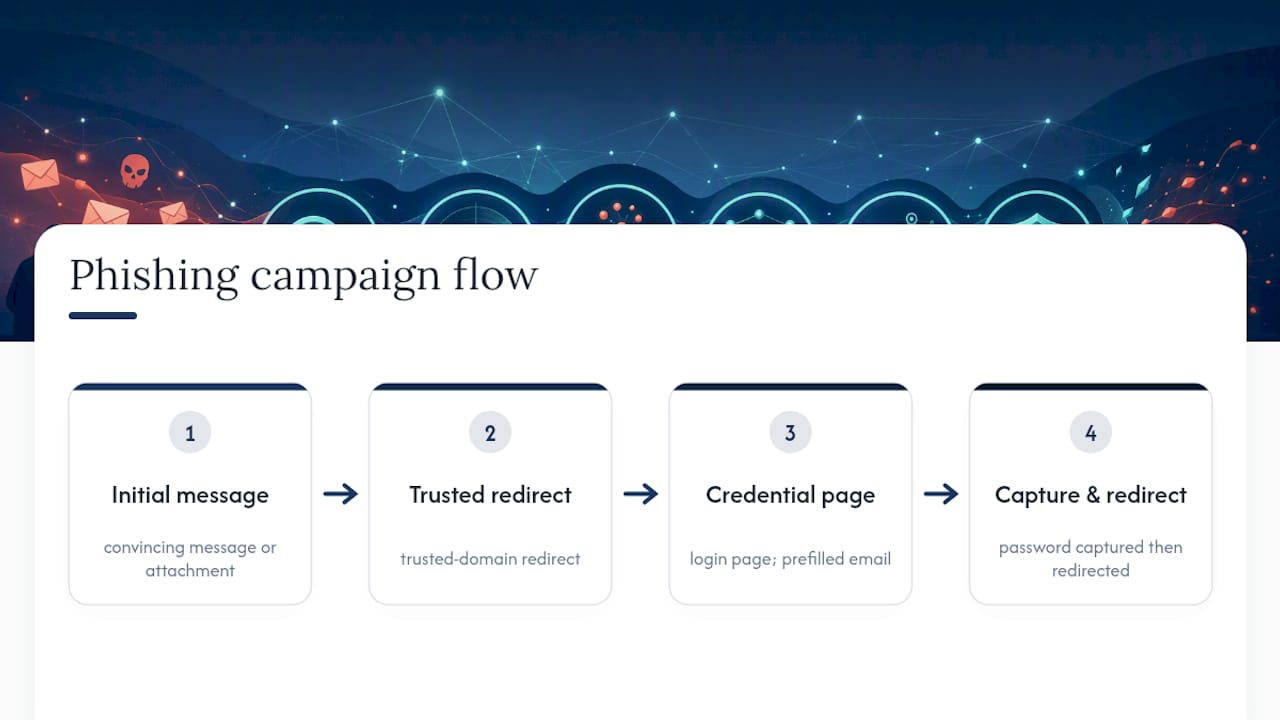
Researchers at Malwarebytes uncovered a campaign abusing Adobe's A/B testing platform to redirect victims to credential-harvesting pages. Routing traffic through legitimate Adobe infrastructure lets the malicious link hide behind a trusted domain, which is exactly the kind of detail that lets phishing slip past both spam filters and a suspicious human eye.
Comment-reply impersonation is another growing tactic. BleepingComputer reported fake "policy violation" comments using LinkedIn's own lnkd.in link shortener to mask malicious destinations, meaning even LinkedIn's official shortener isn't a guarantee of safety on its own.
Statistic to know: Job scams often move fast. Security researchers at McAfee note that a large share of scams targeting job seekers, especially new grads, complete in under an hour from first contact to financial loss. Speed is the weapon; slowing down is the defense.
Three practical checks help here: look up how old the sending domain is, check whether an attachment has a double file extension, and notice if a login page shows your email address already filled in before you've typed anything.
What Are the Red Flags That a LinkedIn Message Is Fake?
Most LinkedIn phishing attempts share a handful of tells once you know where to look. Run through this checklist before you click anything.
- Check the sender's domain. Legitimate LinkedIn emails come from linkedin.com addresses. Lookalike domains ("linkedln.com," "linkedin-jobs.net") are a hard stop.
- Inspect the link destination, not just the link text. Hover on desktop or long-press on mobile to preview where a URL actually goes. Be cautious even with
lnkd.inlinks, since attackers have used LinkedIn's own shortener to mask destinations. - Scrutinize attachments. Files with double extensions like
.pdf.html, or unexpected HTML attachments that ask you to "enable content," are almost never legitimate. - Watch for behavioral pressure. Early requests for money, ID documents, or bank details, plus pressure to move the conversation off LinkedIn to text or WhatsApp, are classic advance-fee tactics.
- Check the profile itself. Brand-new accounts, a thin connection count, and a job history that doesn't match their claimed role are common markers of fake recruiter accounts.
Pro Tip: If a "recruiter" refuses a video call or insists on conducting the entire process by chat, treat that as a red flag on its own. Real hiring managers rarely object to five minutes on camera.
Scammers also tailor pitches to local conditions, emphasizing remote work or fast pay in areas with high unemployment to make the offer feel more urgent and believable.
What Should You Do If You Clicked a Link or Entered Your Password?
Act as though your account is compromised even if the login page redirected you to the real LinkedIn site afterward. That redirect is often intentional, designed to make you think nothing happened.
- Change your LinkedIn password immediately, along with any other account where you reused that same password. A password manager can generate and store a unique one for each site going forward.
- Enable multi-factor authentication if it isn't already on, and check your account settings for unknown devices or active sessions you don't recognize, then revoke them.
- Review connected third-party apps and remove anything unfamiliar. Check your email account for forwarding rules you didn't set up, a common sign of deeper compromise.
- Scan your profile and message history for edits or messages you didn't send. Attackers sometimes use a compromised account to phish your own connections.
- Run a malware scan on any device where you opened an attachment. If you're not confident doing this yourself, get help from someone who is.
- Report financial loss or identity theft to IC3 and the FTC. Save the original message, headers, and screenshots as evidence before you do.
Timing matters. Reporting quickly gives investigators a live trail instead of a cold one. One Business Insider investigation followed a job seeker who lost $4,300 after a scam that started with exactly this kind of message.
How Do You Report LinkedIn Phishing?
LinkedIn has a direct channel for this: forward suspicious emails to phishing@linkedin.com, and use the in-app "Report" option on suspicious messages, comments, or job posts. LinkedIn's own guidance confirms it never asks for your password or a program download, which makes any such request an automatic red flag worth reporting.
When you file a report, include as much as you can:
- The original message or email, forwarded rather than copied and pasted
- Full email headers, which show the actual sending server
- Any attachments, left unopened
- Screenshots of the profile, comment, or job post
- The exact URL, especially if it was shortened or redirected
File with IC3 or the FTC when money changed hands, someone used your identity, or you have evidence pointing to a broader scam campaign rather than a one-off message. The FTC has specifically warned about scammers impersonating well-known companies on job platforms, and reports like yours help build the pattern data that gets campaigns shut down and flagged for other users.
What Habits Actually Reduce Your Risk of LinkedIn Phishing?
A handful of small habits do most of the work here, and none of them require technical skill.
Turn on multi-factor authentication and use an authenticator app rather than text messages when you can. SMS codes can be intercepted through SIM-swapping; app-based codes can't be redirected the same way.
Use a password manager. Reused passwords are exactly what let one leaked credential compromise five different accounts, which is how a single successful phishing email on some unrelated site turns into a LinkedIn takeover months later.
- Limit how much personal detail sits on your public profile. Attackers scrape job titles, employer names, and even manager relationships to make fake recruiter pitches sound personal.
- Verify recruiters through the company's own website or main phone line before sharing anything, rather than trusting a link they send you.
- Access LinkedIn through the official app or a saved bookmark for anything sensitive, not through a link in an email or text.
- Add a browser anti-phishing extension if your browser doesn't already flag known malicious domains by default.
- Consider identity monitoring if you've already had credentials exposed in a prior breach, since that history is often what makes you a target in the first place.
Pro Tip: Set a personal rule: no financial or personal document request gets answered on the same day it arrives, no matter how urgent it sounds. Real opportunities survive a 24-hour delay. Scams often depend on you not taking one.
Keep your devices patched, too. Attackers frequently pair a phishing link with malware that exploits an outdated browser, so the click and the vulnerability work together.
How Scruteon Helps You Stay Ahead of LinkedIn Scams
Scruteon sends free, plain-language alerts about scams like these twice a week, built for readers who don't want to wade through technical jargon to understand what's at risk. Past posts walk through what to do about a Microsoft phishing email, how to check whether a link is actually safe, and how credential stuffing turns one leaked password into several compromised accounts. If you're not sure whether something in your inbox or your LinkedIn messages is real, ask Scruteon directly for free advice, or subscribe to the newsletter for ongoing alerts as new scam patterns emerge.
Sources
- Phishing content | LinkedIn Help
- Fake LinkedIn emails abuse Adobe to track victims | Malwarebytes
- One Click Away: Inside a LinkedIn Phishing Attack | Cofense
- Scammers impersonate well-known companies, recruit for fake jobs on LinkedIn and other job platforms | FTC
- IC3 - Internet Crime Complaint Center
FAQ
How do I know if a LinkedIn message is real?
Check the sender's actual domain, not just the display name, and remember LinkedIn will never ask for your password or ask you to download software. If the message pressures you to act fast or move off-platform, treat it as suspicious until you verify it independently.
How can I report phishing to LinkedIn?
Forward the suspicious email to phishing@linkedin.com or use the in-app "Report" button on the message, comment, or job post. Include the original message and any URLs so LinkedIn's team can trace the source.
How did someone on LinkedIn get my email?
Scammers scrape public profile details, buy leaked data from prior breaches, or harvest addresses from previous phishing responses. Limiting the personal information visible on your public profile reduces how convincing a targeted pitch can be.
What should I do if someone tries to log into my LinkedIn account?
Change your password immediately, enable multi-factor authentication, and check your account's active sessions to revoke any device you don't recognize. If you suspect financial loss or identity theft resulted, report it to IC3 or the FTC as well.
Recommended
- What to Do When You Get a Microsoft Phishing Email
- Is This Link Safe? Quick Checks and Free Tools
- Prevent Identity Theft: 3 Actions That Block Most Takeovers
- Credential Stuffing: What You Need to Know and How to Stop It
The information in this AI-assisted-generated article is for educational purposes. Scam tactics change fast, and we cannot guarantee that this information is always complete or up to date.
By reading this article, you agree that Scruteon is not responsible for any financial losses, fraud, or damages that occur if you rely on this content. This is not professional financial or legal advice. If you suspect you are a victim of a scam, please contact your bank or local law enforcement immediately.