Don't call any number in that message, and don't tap the link. If an alert about your Apple ID looks off, the safest move is to open account.apple.com yourself or check Settings on a device you trust. That single habit defeats almost every version of Apple ID phishing scams making the rounds right now, including fake purchase alerts and MFA bombing. Two quick tells to scan for first: a greeting that doesn't use your real name, and a verification code you never requested.
TL;DR:
- Scammers are now using legitimate Apple mail servers to deliver phishing messages that can pass technical authentication checks, making them harder to detect.
- Many current scams involve fake purchase alerts, callback schemes, MFA flooding, calendar spam, and pop-up alerts designed to appear authentic.
- The best way to verify suspicious messages is to avoid clicking links or calling numbers, and instead log directly into your Apple account through trusted devices or websites.
- If you accidentally share a code or allow remote access, immediately change your Apple ID password, sign out of unrecognized devices, and conduct malware scans.
- Reporting phishing emails and texts directly to Apple or authorities is crucial to help track scam patterns and prevent further attacks.
Table of Contents
- How to Spot Apple ID Phishing Attempts
- How Do I Verify a Suspicious Apple Message?
- What to Do if You Clicked, Called, or Shared a Code
- How to Harden Your Apple ID Against Future Attacks
- Where to Report Apple ID Phishing
- The 4-Step Triage Scruteon Recommends
- Get Apple ID Scam Alerts Before You Need Them
- Sources
- FAQ
How to Spot Apple ID Phishing Attempts
The classic red flags still work. Watch for an unexpected charge notice for something you never bought, a phone number embedded in the message body, or language pushing you to act in the next few minutes. Real Apple communications don't threaten account suspension in the next hour.
What's changed is more troubling. Researchers at Xcitium's ThreatLabs found attackers stuffing phishing text directly into the profile name field during account changes. Apple's own system then generates and sends the notification, meaning the email genuinely comes from Apple's mail servers and can pass SPF, DKIM, and DMARC checks. A message that looks authentic on every technical level can still be a scam.
Common tactics circulating right now:
- Fake purchase alerts: a notice claiming you bought an $899 iPhone, with a "customer service" number to dispute it, as documented by TechRepublic.
- Callback scams: the goal isn't the click, it's the call, where a live scammer walks you through "canceling" the order while harvesting codes or installing remote access tools.
- MFA bombing: attackers who already have your password flood your devices with authentication prompts, hoping fatigue makes you approve one or read off a code, a pattern KrebsOnSecurity has tracked closely.
- Calendar invite spam: junk invites with phishing links buried in the event title or notes field.
- Pop-up alerts: browser or in-app pop-ups mimicking Apple's design to harvest your Apple ID password.
How Do I Verify a Suspicious Apple Message?
Run this checklist before you do anything else:
- Don't click, call, or reply. Treat every phone number and link in the message as untrusted, even if the sender address is appleid@id.apple.com.
- Go straight to account.apple.com. Log in independently, or check Settings on an iPhone or Mac you already trust, and look at Sign-In and Security for anything unfamiliar.
- Inspect the headers, but don't rely on them alone. SPF, DKIM, and DMARC can all pass because attackers are abusing legitimate Apple mail infrastructure to deliver the message, not spoofing the domain outright.
- Look for content mismatches. A generic greeting, odd line breaks, or text that seems crammed into a field that shouldn't hold a sentence are signs the message has been manipulated.
Pro Tip: If you get a verification code or push prompt you didn't request, don't tap "Allow" and don't type the code anywhere. Log in through account.apple.com on a separate, trusted device instead. If your account is genuinely under attack, this shows it without exposing anything to the scammer.
What to Do if You Clicked, Called, or Shared a Code
Speed matters here. If you entered your Apple ID password or a one-time code on a fake site or read it to someone on the phone, act in this order:
- Change your Apple ID password immediately from a trusted device or at account.apple.com.
- Sign out of all sessions and devices you don't recognize, then confirm two-factor authentication is still active.
- If the attack pattern involved MFA bombing, know that the goal was to get you to approve a prompt out of exhaustion, per Krebs's reporting on the technique, so revoking sessions afterward is not optional.
- If you allowed remote access or installed anything, disconnect from the internet, uninstall the remote tool, and run a malware scan before reconnecting.
- Screenshot the message, note the timestamp, and save any headers before you delete anything. You'll need this for reporting.
- Call your bank or card issuer if you shared payment details or suspect a charge went through; most will flag or freeze the card within minutes.
Apple's own guidance lists unexpected 2FA prompts, unfamiliar sign-ins, and changed account details as the clearest signs your account is already compromised, and it walks through the same lockdown sequence: see Apple's compromised-account steps.
How to Harden Your Apple ID Against Future Attacks
A few changes now save you a bad afternoon later.
- Turn on two-factor authentication if you haven't, and where Apple offers it, add a Security Key, a physical hardware key that makes remote account takeover far harder even if your password leaks, as Apple explains in its own setup guide.
- Weigh the trade-off honestly: Security Keys are more resistant to phishing than SMS codes, but you have to carry them and register a backup, or you risk locking yourself out.
- Use a unique password for your Apple ID, stored in a password manager, and switch to passkeys anywhere Apple supports them.
- Review your trusted devices and recovery contacts in Settings every few months and remove anything you no longer own.
- Adopt one hard rule: never call a number that arrived inside a text, email, or pop-up. Look up Apple's number yourself if you need to talk to a person.
Pro Tip: Treat any unsolicited verification code as a red flag, not an inconvenience. Apple never sends a code you didn't just request seconds earlier by trying to sign in yourself.
Where to Report Apple ID Phishing
Reporting does two things: it gets the message analyzed, and it builds the pattern data that helps flag future scams faster.
- Forward phishing emails to reportphishing@apple.com. Include the full message with headers intact rather than a screenshot alone.
- Forward phishing texts to 7726 (SPAM). This routes the message to your carrier for filtering.
- File a report at Reportfraud if you lost money or shared financial information, the FTC's advice specifically calls out preserving evidence and forwarding suspicious texts to 7726.
- Use official Apple contact paths only, account.apple.com or getsupport.apple.com, never a number or link from the suspicious message itself.
- Contact your bank and, if identity theft is involved, consider a fraud alert with a credit bureau.
The 4-Step Triage Scruteon Recommends
We built this workflow after watching the same patterns repeat across reader questions: Spot the mismatch (urgency, unfamiliar number, odd greeting). Verify independently at account.apple.com, never through the message. Isolate the device if you clicked anything, disconnect and scan before reconnecting. Report to reportphishing@apple.com or ReportFraud.ftc.gov so the pattern gets logged.
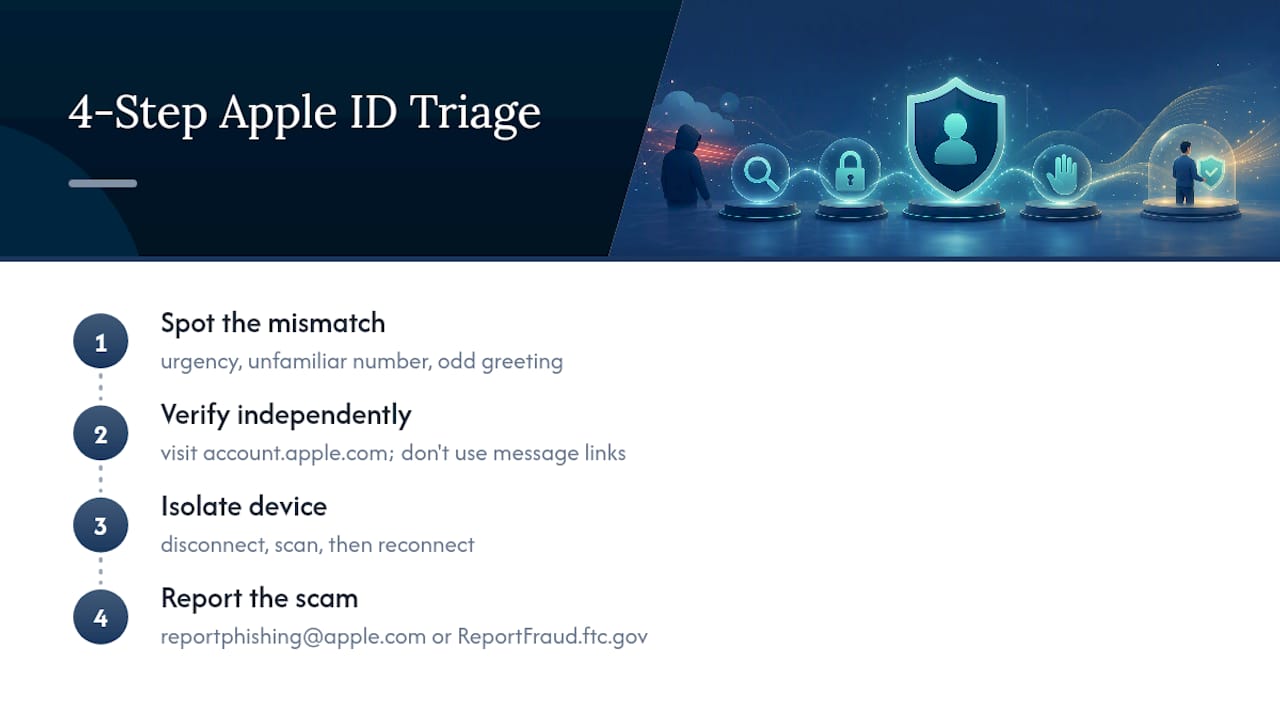
It takes 10 to 15 minutes and mirrors the same triage we've walked readers through for Microsoft phishing emails and iPhone calendar spam, where the scam channel changes but the instinct to slow down and verify independently stays the same.
Get Apple ID Scam Alerts Before You Need Them
Most people learn about a new Apple ID scam after it's already cost someone money. Scruteon exists to flip that timing: a free newsletter that flags scam patterns while they're still spreading, not after.
The newsletter sends regular emails covering real scams in plain language, including romance scams, tech support fraud, phishing, and tactics like those described above, each one built around what to look for and what to do about it. If you're unsure whether something you received is legitimate, you can also send it in through Scruteon's free advice page and get a straight answer instead of guessing. Start at the Scruteon homepage to see recent alerts and sign up for the next one.
Sources
For deeper reading beyond this guide: Apple's own compromised-account walkthrough, the Xcitium ThreatLabs breakdown of embedded-alert abuse, BleepingComputer's coverage of the same tactic, and KrebsOnSecurity's MFA bombing analysis. For recovery and forensics questions beyond Apple's own support, Recovera Forensics covers incident analysis in more technical depth.
- If you think your Apple Account has been compromised - Apple Support
- Apple Account Change Notifications Exploited in Phishing Scam
- Recent ‘MFA Bombing’ Attacks Targeting Apple Users – KrebsOnSecurity
- Reportfraud
- Apple phishing scam: fake $899 iPhone purchase alert
FAQ
What Does a Fake Apple Security Alert Look Like?
It usually mimics a purchase confirmation or account-lock warning, includes a callback number or link, and pushes urgency, but the giveaway is often a generic greeting or a message crammed with mismatched formatting where real Apple text wouldn't be.
Why Am I Getting a Message That My Apple ID Is Being Used?
You may be receiving a genuine Apple notification triggered by an attacker who altered a field like a profile name during an account-change attempt, which means the email can come from real Apple servers even though it's part of a scam.
How Can I Tell if My Apple ID Has Been Hacked?
Apple lists unexpected two-factor codes, sign-ins from unfamiliar locations, and account detail changes you didn't make as the clearest signs, and the fix is to log in at account.apple.com immediately to review activity.
How Do I Know if a Message From Apple Is Legitimate?
Never judge it by the sender address alone. Verify independently by opening account.apple.com or checking Settings on a device you already trust, rather than clicking anything inside the message itself.
Recommended
- Spot Scam Warning Signs in 5 Minutes, Verify and Report (U.S.)
- What Is an MFA Fatigue Attack, and How Do You Stop One?
- Stop LinkedIn Phishing in Under an Hour With a 6 Step Triage
- What to Do When You Get a Microsoft Phishing Email
The information in this AI-assisted-generated article is for educational purposes. Scam tactics change fast, and we cannot guarantee that this information is always complete or up to date.
By reading this article, you agree that Scruteon is not responsible for any financial losses, fraud, or damages that occur if you rely on this content. This is not professional financial or legal advice. If you suspect you are a victim of a scam, please contact your bank or local law enforcement immediately.