
Typosquatting is when scammers register domain names that look almost identical to real ones (think “amaz0n.com” or “paypa1.com”) and use them to steal your money, passwords, or personal data. The single most effective defense costs nothing: stop typing addresses for banks, email, or shopping sites into the address bar, and use a bookmark or password manager instead. Security researchers at Cisco tracked more than 30,000 lookalike domains impersonating major brands in just a six-month window, and roughly a third turned out to be malicious. That’s not a fringe problem.
Before you read further, do these two things:
-
Add your bank, email provider, and most-used shopping sites to your browser bookmarks bar today.
-
Turn on your browser’s built-in typo and lookalike warnings if you haven’t already.
Key Takeaways
Typosquatting scams succeed by exploiting quick glances at URLs, and bookmarks, password managers, and multi-factor authentication together close most of that gap.
| Point | Details |
|---|---|
| Skip manual typing | Use bookmarks or a password manager for banking, email, and shopping sites instead of typing addresses. |
| Watch for subtle domain edits | Homoglyphs, combosquatting, and missing dots are the three most common lookalike tricks. |
| Scale is real | Cisco tracked over 30,000 lookalike domains in six months, with roughly a third confirmed malicious. |
| Act fast if exposed | Change passwords on a clean device, enable MFA, and report the domain immediately. |
| Legal remedies exist but have limits | ACPA and UDRP can force domain transfers, though anonymous overseas registrants slow enforcement. |
Table of Contents
What Is Typosquatting and How Do These Scams Work?
Typosquatting starts with domain registration. Scammers buy up misspelled or visually similar versions of popular websites, sometimes hundreds at a time, because registration costs almost nothing and the payoff from even a handful of victims covers the expense many times over. Microsoft describes typosquatting as registering common misspellings or small character edits of legitimate domains, then waiting for traffic or actively driving it there.
The delivery methods vary, but the goal is the same: get you to click.
-
Phishing emails and texts that spoof a company’s name and link to the fake domain.
-
Social media posts and ads that look like promotions from a trusted brand.
-
Search engine results, since some squatters buy paid ads on their fake domains.
-
Simple typing mistakes, especially on mobile keyboards where a missed key or autocorrect can land you on the wrong site entirely.
Once you arrive, the site often mirrors the real one almost perfectly. Fake login forms harvest your username and password. Some pages silently trigger drive-by downloads that install malware without you clicking anything. Mobile browsing makes all of this worse, since small screens hide the URL bar and shrink your margin for noticing something is off.
What Are the Common Types of Lookalike Domains?
Not every fake domain looks the same, and recognizing the pattern helps you catch one faster.
-
Homoglyph or homograph attacks swap letters for near-identical characters, like a zero for the letter “O” or a capital “I” for a lowercase “l”. These are the hardest to catch on a phone screen, where font rendering already blurs small differences.
-
Combosquatting adds an extra word, like “login,” “support,” or “secure,” to a real brand name. Cisco’s research flags this as increasingly common because it feels plausible to someone scanning quickly rather than reading the full address.
-
Doppelganger domains drop or alter a single character, often a missing dot or hyphen, so “mail.company.com” becomes “mailcompany.com,” a completely different site owned by someone else.
-
Extra-word or hyphenated variants insert dashes or words attackers hope you’ll skim past, like “my-bankonline.com.”
Every one of these relies on you glancing rather than reading.
What Happens if You Land on a Typosquatting Site?
The most immediate danger is credential theft. Type your username and password into a cloned login page, and an attacker now has access to your real account within minutes, often before you’ve even noticed something felt off.
By the numbers: Cisco observed more than 30,000 lookalike domains impersonating popular sites between February and July 2024, and roughly one in three was confirmed malicious.
Beyond stolen logins, some typosquatting sites push malware through drive-by downloads, infecting your device the moment the page loads, sometimes without any click at all. That malware can range from spyware that logs your keystrokes to ransomware that locks your files until you pay. Kaspersky’s analysis of lookalike domains ties many of these campaigns to business-email-compromise schemes, where stolen credentials open the door to larger financial fraud, sometimes targeting entire companies through one employee’s mistake.
How Can You Spot a Typosquatting Domain Quickly?
Run through this checklist any time a link feels slightly off, especially one that arrived by email or text.
-
Read the domain letter by letter, not just at a glance. Look for swapped characters, extra words, or a missing dot.
-
Confirm the site uses HTTPS, but don’t treat the padlock as proof of legitimacy. Scammers can get valid certificates for fake domains too.
-
Watch for visual glitches: slightly off logos, broken layout, unexpected pop-ups, or a payment flow that asks for information a real site wouldn’t request upfront.
-
Pay attention to browser warnings. Chrome’s lookalike detection compares the domain you’re visiting to popular or previously visited sites and flags a “Did you mean…” warning when something looks suspicious.
-
Never trust a link just because it arrived from someone you know. Their account may already be compromised.
Pro Tip: Chrome’s warning system works by comparing new domains against sites you’ve visited before or that rank highly in traffic. Brand-new, low-traffic lookalikes can slip past that heuristic entirely, so don’t treat “no warning” as a green light.
What Are the Best Practical Protections Against Typosquatting?
Layering a few habits does more than any single tool.
-
Bookmark every site where you enter sensitive information: banking, email, healthcare portals, and payroll systems. Click the bookmark instead of typing the address.
-
Use a password manager. Most will only autofill credentials on the exact domain they were saved for, which means a lookalike site simply won’t trigger the autofill, a useful tell on its own.
-
Turn on your browser’s built-in lookalike and typo protections, and keep your browser and operating system updated so security patches stay current.
-
Run reputable antivirus software with real-time web protection, and enable Safe Browsing features where your browser offers them.
-
Turn on multi-factor authentication everywhere it’s available, so a stolen password alone isn’t enough to break into your account.
Pro Tip: If a “password manager” doesn’t offer to autofill your login on a site you’re sure is correct, stop and check the URL character by character before typing anything manually.
None of this requires technical expertise. It requires making these steps automatic, the same way you’d double-check a locked door.
What Should You Do if You Visited a Typosquatting Site?
Act in this order if you suspect you clicked a fake link or entered information on one:
-
Close the tab immediately. If you downloaded anything or the page behaved strangely, disconnect from Wi-Fi to limit further contact.
-
Switch to a device you know is clean and change the password for any account you may have exposed, then log out of all active sessions.
-
Turn on multi-factor authentication if it wasn’t already active, and check your account activity log for anything unfamiliar.
-
Report the domain to its registrar, your browser vendor, and any platform (bank, retailer, email provider) it was impersonating.
-
Save screenshots of the fake site and copy the exact URL before it potentially disappears. This evidence matters if you pursue a report later.
Run a full antivirus scan on the device you used, just in case a drive-by download slipped through unnoticed.
What Legal Options Exist for Fighting Typosquatting?
Two main legal paths exist for challenging an abusive domain: the Anticybersquatting Consumer Protection Act in the U.S. and the international Uniform Domain-Name Dispute-Resolution Policy, both designed to force bad-faith registrants to give up a domain.
-
ACPA suits typically apply when a domain was registered in bad faith to profit from a trademark you own.
-
UDRP complaints move faster and cost less than litigation but only work if you can prove the registrant lacks a legitimate interest and acted in bad faith.
-
Registrar abuse reports and hosting provider complaints are free and often the fastest way to get a malicious site taken down, even without a formal legal filing.
-
Anonymous registration and overseas hosting frequently blunt these tools; expect delays, and consider law enforcement or your state consumer protection office when real financial loss occurred.
Why Trust This Guide on Typosquatting Scams?
Scruteon publishes a free newsletter covering real scams as they emerge, one to two posts weekly, written in plain language. If you’re ever unsure whether a link or site is legitimate, Scruteon’s free advice service lets you ask directly.
What New Typosquatting Tactics Should You Watch For?
Typosquatting hasn’t stayed static. Researchers continue documenting campaigns that follow wherever money and attention move, and lately that means cryptocurrency platforms and logistics services, both industries where users expect frequent password entry and urgent account notifications, which makes them ideal targets for cloned login pages.
Combosquatting has grown more sophisticated too. Instead of obvious add-ons like “login” or “secure,” newer campaigns append terms that mimic internal company language, things like “portal” or “sso,” designed to fool employees rather than casual consumers. That shift matters because it signals attackers researching their targets rather than casting a wide net.
Brandjacking, copying a legitimate site’s exact design, fonts, and layout, has also become the default rather than the exception. Insights from domain dispute filings show a record volume of cases reaching the World Intellectual Property Organization in 2025, reflecting just how many organizations are now fighting to reclaim lookalike domains built to impersonate them.
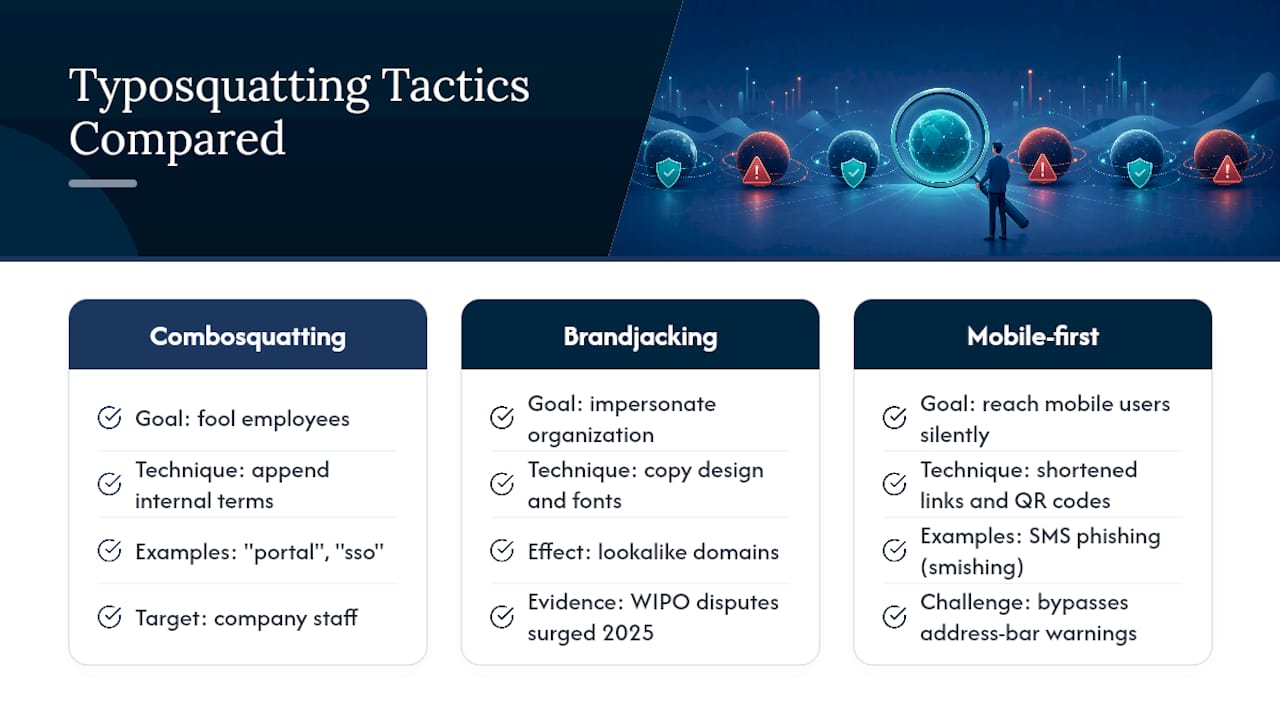
Mobile-first attacks are also rising. Shortened links, QR codes on flyers or parking meters, and SMS phishing (often called “smishing”) route victims to typosquatted domains without ever showing a full, readable URL. That trend outpaces older desktop-focused defenses, since many browser lookalike warnings were built with a full address bar in mind, not a scanned code or a truncated text link.
What Real Incidents Show About Typosquatting’s Impact
The scale Cisco documented, 30,000-plus lookalike domains tracked in a single six-month window with a third confirmed malicious, isn’t an abstract number. Each one represents a specific brand impersonated and a specific set of victims targeted, often repeatedly, as old domains get taken down and new ones pop up in their place.
Business-email-compromise cases tied to lookalike domains follow a familiar pattern documented by security researchers: an employee receives what looks like an internal email from a vendor or executive, the email links to a spoofed portal, and the credentials entered there open the door to wire transfer fraud or payroll diversion. Kaspersky’s analysis of these schemes shows how convincingly cloned interfaces make the difference between a caught phishing attempt and a costly breach.

Cryptocurrency exchanges have faced a particularly aggressive version of this problem, since account recovery options are limited or nonexistent once funds move. A single successful login on a fake exchange portal can result in an irreversible loss within minutes, a stark contrast to a bank, which can often freeze or reverse a fraudulent transfer if reported quickly enough.
The common thread across these incidents isn’t sophistication. It’s speed and familiarity, attackers exploiting the fact that most people glance at a URL rather than read it.
Practical Vigilance, Not Paranoia
Good defense against typosquatting isn’t about distrusting every link forever. It’s about building two or three small habits, bookmarking key sites, using a password manager, reporting anything suspicious, and letting them run on autopilot. Scruteon keeps tracking new scam patterns so you don’t have to relearn this every time attackers shift tactics.

Frequently Asked Questions
What is typosquatting in simple terms? Typosquatting is registering a domain name that closely resembles a real website, often through a misspelling or small character swap, to trick visitors into thinking they’re on the legitimate site.
How do I know if a link is a typosquatting scam? Read the full domain slowly, watch for extra words, swapped letters, or missing punctuation, and check whether your browser shows a lookalike warning before entering any information.
Can visiting a typosquatting site infect my device without clicking anything? Yes. Drive-by downloads can exploit browser vulnerabilities the moment a malicious page loads, which is why closing the tab immediately and running an antivirus scan matters even if you didn’t type anything.
Is typosquatting illegal? Registering a domain in bad faith to profit from someone else’s trademark can violate the Anticybersquatting Consumer Protection Act in the U.S. or qualify for a UDRP complaint internationally, though enforcement against anonymous or overseas registrants is often slow.
What should I do first if I entered a password on a fake site? Switch to a device you trust, change that password immediately, log out of all active sessions, and turn on multi-factor authentication before doing anything else.
The information in this article is for educational purposes only. Scam tactics change fast, and we cannot guarantee that this information is always complete or up to date.
By reading this article, you agree that Scruteon is not responsible for any financial losses, fraud, or damages that occur if you rely on this content. This is not professional financial or legal advice. If you suspect you are a victim of a scam, please contact your bank or local law enforcement immediately.
Sources
For deeper technical detail, Microsoft’s typosquatting explainer covers browser-level protections, while Chromium’s lookalike documentation explains detection limits. Cisco’s security analysis and Kaspersky’s BEC research offer real-world attack data, and the ACPA overview explains legal recourse.