
Public Wi‑Fi is fine for checking sports scores or reading the news. It is not fine for logging into your bank, and the reason has changed: the danger today isn’t someone silently reading your traffic, it’s a fake network or a fake login page tricking you into handing over your password yourself. The FTC warns that even encrypted, padlocked sites can be scams. The single best move: do anything sensitive on your phone’s cellular hotspot or through a vetted, no-logs VPN, never on the coffee shop network directly.
-
Casual browsing (news, maps, weather): low risk on any open network
-
Logging into banking, email, or work accounts: use your hotspot or VPN
-
Entering a password into a hotel or airport “sign in” page: treat it as untrusted by default
Key Takeaways
Evil twin networks and hijacked captive portals, not passive sniffing, are the dominant public Wi‑Fi threat in 2026, and disabling auto-join plus using a hotspot for sensitive tasks closes off most of that risk.
| Point | Details |
|---|---|
| HTTPS isn’t proof of safety | A padlock icon confirms encryption, not that the site or portal behind it is legitimate. |
| Evil twins exploit auto-join | Turn off auto-join and forget old public networks to remove a key attack vector. |
| Captive portals are untrusted forms | Never enter a primary password or OAuth login into a Wi‑Fi sign-in page. |
| Hotspot beats public Wi‑Fi for sensitive tasks | Use your phone’s cellular connection or an audited no-logs VPN with a kill switch. |
| Speed matters after a scam | Change passwords, revoke sessions, and report to reportfraud.ftc.gov right away. |
Table of Contents
-
How Public Wi‑Fi Actually Works (and Why That Makes It Risky)
-
Mobile Devices vs. Laptops: Different Risks on the Same Network
Why the Public Wi‑Fi Threat Model Changed
A decade ago, the scary story was someone sitting in a café sniffing raw traffic off the air and pulling passwords straight out of it. That attack still exists, but it barely works anymore. Encryption now covers the overwhelming majority of web traffic, so a stranger on the same network usually can’t read what you type into a login form just by watching packets fly by, according to SpeedTestHQ’s 2026 guide.
That doesn’t mean public Wi‑Fi is safe by default. Your device still broadcasts DNS lookups and SNI data, the technical breadcrumbs that reveal which sites you’re visiting even when the content itself is locked. A network operator, or someone impersonating one, can see that you went to your bank’s login page even if they can’t see your password.
The real 2026 risk isn’t sniffing, it’s impersonation. Attackers now build fake access points that look identical to the real one, or hijack the captive portal (the sign-in page you see before you get online) to harvest credentials directly. Malwarebytes has documented campaigns where hotel guests were redirected through fake update prompts and phishing pages baked right into the Wi‑Fi login flow. The FTC’s own guidance is blunt on this point: a valid HTTPS padlock proves the connection is encrypted, not that the site behind it is legitimate.
Common Public Wi‑Fi Scams and How Each One Works
Most public Wi‑Fi scams fall into four buckets, and each one has a tell if you know where to look.
-
Evil twin networks. An attacker sets up a hotspot named something like “Airport_Free_WiFi” or a near-perfect copy of the venue’s real SSID. Devices that auto-join previously used networks are especially exposed, because the phone reconnects without asking. MITRE ATT&CK catalogs this as technique T1557.004, an adversary-in-the-middle method where the fake access point either eavesdrops or redirects victims straight to a phishing page.
-
Fake captive portals. The sign-in screen asks for more than a room number or email, it wants your Google or Facebook login, or it pushes a “required” app install. Any portal requesting a primary account password or an OAuth sign-in is a red flag; legitimate venue Wi‑Fi almost never needs that.
-
Compromised routers and DNS manipulation. If the venue’s actual router has been hacked, even a genuine network name can quietly redirect you to spoofed banking or webmail sites.
-
Malicious update or “ClickFix” prompts. A pop-up demanding you install a codec, VPN app, or security patch before you can browse is a malware delivery mechanism, not a network requirement.
How to Spot a Scam Connection Before You Type Anything
Run these checks the moment you connect, before entering anything into a browser or a login form.
-
Confirm the exact network name with staff. Ask the barista or front desk for the precise SSID; don’t guess between two similar-looking options.
-
Skip anything generic or duplicated. If you see two networks with the same or nearly identical name, that’s often the setup for an evil twin.
-
Never enter your real password into a captive portal. If the sign-in page asks for a Google, Microsoft, or banking login instead of just email or room number, close it.
-
Don’t ignore certificate warnings. A browser flagging a mismatched or invalid certificate on a site you trust is one of the few remaining reliable signals something is wrong.
-
Be suspicious of unusually strong signal or a network that appeared out of nowhere. Evil twins are often placed close to victims and broadcast at high power to outcompete the legitimate router.
Pro Tip: If a captive portal ever asks you to “update your browser” or “install a security certificate” to continue, disconnect immediately. Legitimate Wi‑Fi logins never require a software install.
A Three‑Minute Public Wi‑Fi Safety Checklist
You don’t need to become a security professional to close off most of this risk. A short setup, done once, plus a couple of habits, handles nearly everything covered above. Security researchers at SecureRank point to a short list of high-leverage fixes that take minutes to configure and remove most of the meaningful risk.
Device settings (do this once):
-
Turn off Wi‑Fi auto-join for public and unknown networks in your phone and laptop settings.
-
Forget old public networks you no longer use, since a saved SSID is exactly what evil twins exploit.
-
Disable file sharing and printer sharing when you’re off your home or office network.
-
Confirm your device’s firewall is switched on.
Transport protections (do this per session): 5. Prefer your phone’s cellular hotspot for anything sensitive, banking, work email, tax filing. 6. If a hotspot isn’t practical, use a reputable, audited no-logs VPN and turn on its kill switch feature so traffic stops entirely if the VPN drops. PCWorld’s security team cautions that a free or low-quality VPN can expose more data than no VPN at all, since some free providers log and resell browsing activity.
Account hardening (ongoing habit): 7. Use a password manager so you’re never typing a memorized password into a page you haven’t verified. 8. Turn on two-factor authentication or passkeys everywhere they’re offered, so a stolen password alone isn’t enough to break in. 9. Keep your phone and laptop operating systems updated, since patches often close the exact flaws evil-twin campaigns rely on.
Behavior (do this every time): 10. Treat every captive portal as an untrusted web form. Use a throwaway email address for hotel or airport Wi‑Fi sign-ups instead of your primary inbox.
Pro Tip: Set up your phone’s hotspot name and password once and save it as a favorite. When a checklist item takes three seconds, you’ll actually do it every time instead of only when you remember.
If You Think You Were Scammed on Public Wi‑Fi
Move fast, and move to a trusted network first, before you fix anything else.
-
Disconnect immediately and switch to your cellular connection or home network.
-
Change important passwords from a device you know is clean, starting with email, banking, and any account tied to financial recovery.
-
Revoke active sessions and app tokens in your account security settings, this logs out anyone who may have grabbed a session cookie rather than a password.
-
Turn on two-factor authentication or passkeys if you haven’t already, and run an anti-malware scan checking for unfamiliar apps or certificates.
-
Report it. File a report at Reportfraud, start a recovery plan at Identitytheft if personal information was exposed, and for significant financial loss or targeted attacks, the FBI’s cyber pages outline how to escalate further.
Most people who catch a fake portal within a few minutes lose nothing more than a wasted login attempt, but delaying the password change and session revocation is what turns a near miss into an actual breach.
Why Trust This Guide and How Scruteon Helps You Stay Alert
This guide draws on FTC consumer guidance, MITRE’s technical threat catalog, and current security reporting on hotel and airport Wi‑Fi campaigns, not guesswork.
-
Scruteon sends short, plain-language alerts on real-time scams, romance fraud, phishing, tech support scams, one to two times a week.
-
Got a suspicious captive portal or login page in front of you right now? Submit it through Scruteon’s free advice page before you type anything.
-
Written by Winston for Scruteon’s ongoing scam-prevention coverage.
How Public Wi‑Fi Actually Works (and Why That Makes It Risky)
A public Wi‑Fi network is just a router broadcasting a signal that any device in range can join, usually with no password or a shared one printed on a receipt. Once you connect, your traffic hops from your device to that router, then out to the internet through the venue’s connection. Everyone sharing that router is, technically, sharing the same local network segment.
That shared structure is the root of every risk in this article. On your home Wi‑Fi, you control the router, you set the password, and you know who else is on it. On public Wi‑Fi, you’re trusting a device you’ve never seen, configured by someone you’ll never meet, and you have no way to verify it hasn’t been swapped for a lookalike. An evil twin exploits this trust gap directly: your phone can’t visually tell the difference between the café’s real router and an attacker’s laptop broadcasting the same name from the next table.
The captive portal adds a second layer of exposure. That sign-in page you see before getting online isn’t part of the open internet, it’s served locally by whatever hardware runs the network, which means a compromised or spoofed router can inject anything into that page, including fake login prompts, fake update requests, or tracking scripts that follow you well past that session. None of this requires sophisticated hacking. Setting up a convincing fake hotspot takes cheap, widely available hardware, which is exactly why evil twins have become the dominant scam vector instead of a rare, high-skill attack.
Mobile Devices vs. Laptops: Different Risks on the Same Network
Phones and laptops face the same network but not the same exposure. Phones auto-join saved networks far more aggressively than laptops do, and that single behavior is the biggest mobile-specific risk. If your phone has ever connected to “Airport_WiFi” at any airport, it may reconnect automatically to any network broadcasting that same name, no user action required, which is precisely how evil twins catch mobile users who never opened a browser.

Laptops carry a different weak point: file and printer sharing settings, often left on from home or office use, can expose a device to other users on the same public network segment. A laptop with sharing enabled on a public network is effectively announcing its folders to everyone else in the coffee shop.
Push notifications and background app refresh compound mobile risk further. Apps on a phone sync in the background over whatever network is active, including a spoofed one, often before you’ve even opened the app or noticed anything unusual. Laptops tend to be more deliberate, since most sensitive activity happens through an actively opened browser tab where a certificate warning has a better chance of catching your attention.
The practical takeaway: disable auto-join on phones specifically, since that’s the mobile-specific gap, and check file-sharing settings on laptops specifically, since that’s the laptop-specific gap. Both device types benefit equally from the hotspot-or-VPN rule for anything sensitive.
Legal and Privacy Considerations on Public Wi‑Fi
Connecting to public Wi‑Fi isn’t illegal, but a few legal and privacy realities are worth knowing. Most venues require you to accept terms of service through the captive portal, and those terms sometimes include data collection clauses covering your device identifiers, browsing patterns, or location, used for advertising rather than security. Reading exactly what a portal is asking you to agree to matters more than most people assume.
Separately, intercepting someone else’s traffic on a network you don’t own or operate is illegal in the United States under federal wiretapping and computer fraud statutes, regardless of how “open” the network appears. That legal protection exists for you as a user, but it does nothing to stop someone who’s already set up a fake network specifically to violate it, since the deception happens before any interception occurs.
Privacy-wise, DNS and SNI leakage (the technical trail revealing which domains you visit) remains a factor even on fully encrypted connections. A venue operator, or an attacker impersonating one, can build a rough profile of your browsing habits from that metadata alone, without ever reading message content. A no-logs VPN tunnels that DNS and SNI data away from the local network, which is the actual privacy benefit VPNs provide on public Wi‑Fi, distinct from their encryption function. Understanding that distinction helps you evaluate VPN claims accurately instead of assuming a VPN makes you invisible.
Tools and Apps That Help Spot Malicious Hotspots
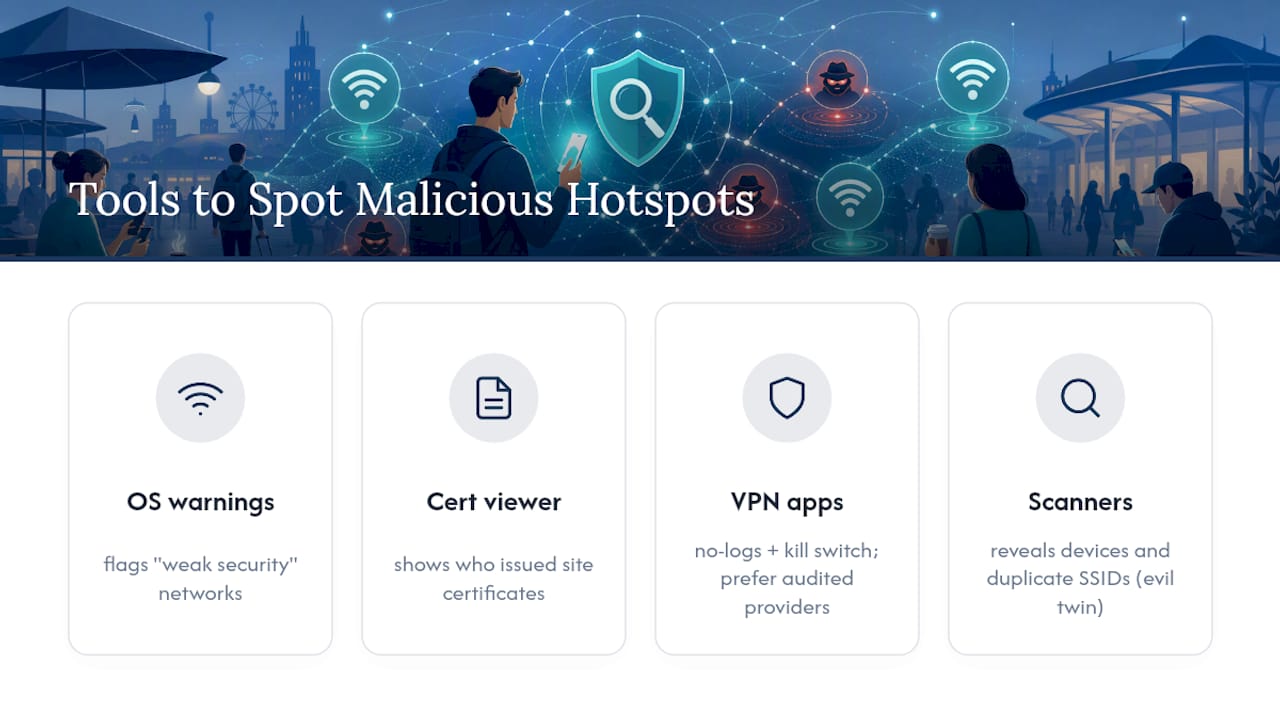
A handful of practical tools reduce guesswork instead of relying entirely on your own vigilance. Built-in options come first: both iOS and Android will flag a network as having “weak security” or show a warning icon for networks without proper encryption, worth reading rather than dismissing. Your browser’s certificate viewer, accessible by clicking the padlock icon, shows you exactly who issued a site’s certificate, useful for spotting a mismatch between the domain you expect and the certificate presented.
For active protection, a reputable no-logs VPN app with a kill switch remains the single most useful tool category, since it addresses the DNS and SNI leakage problem directly rather than just alerting you to it. Look for VPN providers that publish independent audits of their no-logs claims rather than taking marketing copy at face value, a distinction PCWorld’s security coverage flags as the difference between meaningful protection and a false sense of security.
Network scanner apps that show all devices and access points broadcasting in range can help you spot duplicate SSIDs, a direct signal of an evil twin setup, though they require a bit more technical comfort to interpret correctly. For most everyday users, the combination of a hotspot for sensitive tasks, a vetted VPN for everything else, and healthy skepticism toward captive portals covers the vast majority of realistic scenarios without needing specialized scanning software at all.
Ready for ongoing alerts instead of a one-time checklist? Scruteon’s free newsletter sends short, real-time breakdowns of active scams, including the fake Wi‑Fi portals and evil-twin campaigns making the rounds, so you hear about new tactics before you run into one yourself.
The 2026 Reality Check on Public Wi‑Fi Advice
Most of the “public Wi‑Fi will steal your password” warnings still circulating date from an era before HTTPS was standard. That advice isn’t wrong so much as it’s aimed at the wrong threat. Passive sniffing barely works against encrypted traffic now, and yet public Wi‑Fi panic hasn’t updated to reflect that the real danger moved to impersonation: evil twins, hijacked captive portals, and fake update prompts.
The gap between old advice and current risk causes real harm. People who’ve heard “public Wi‑Fi is dangerous” for a decade tune it out as background noise, exactly when a convincingly named fake network sits three feet away. The conventional wisdom overprotects against a fading threat while underpreparing people for a growing one.
If you take one thing from this guide, make it the three-minute checklist: kill auto-join, prefer your hotspot for anything sensitive, and never type a real password into a captive portal. Everything else, VPNs, password managers, certificate checks, matters, but that trio closes off the attacks actually working in 2026. Subscribe to a resource that tracks these shifts as they happen; scam tactics evolve faster than static advice pages can keep up.
The information in this article is for educational purposes only. Scam tactics change fast, and we cannot guarantee that this information is always complete or up to date.
By reading this article, you agree that Scruteon is not responsible for any financial losses, fraud, or damages that occur if you rely on this content. This is not professional financial or legal advice. If you suspect you are a victim of a scam, please contact your bank or local law enforcement immediately.
Sources
-
Travelers targeted when logging into hotel Wi‑Fi networks — Malwarebytes
-
Public Wi‑Fi Security in 2026: Airports, Hotels, Cafés and Coworking Spaces — SecureRank
-
Adversary-in-the-Middle: Evil Twin, Sub-technique T1557.004 — MITRE ATT&CK